SpringCloud技术栈
cloud-eureka
服务端
<!-- 依赖 -->
<dependency>
    <groupId>org.springframework.cloud</groupId>
    <artifactId>spring-cloud-starter-netflix-eureka-server</artifactId>
</dependency>
-- 加注解
@EnableEurekaServer
server:
  port: 8001 #指定运行端口
spring:
  application:
    name: eureka-server #指定服务名称
eureka:
  instance:
    hostname: localhost #指定主机地址
  client:
    fetch-registry: false #指定是否要从注册中心获取服务(注册中心不需要开启)
    register-with-eureka: false #指定是否要注册到注册中心(注册中心不需要开启)
  server:
    enable-self-preservation: false #关闭保护模式
-- 访问
http://localhost:8001/
客户端
<dependency>
    <groupId>org.springframework.cloud</groupId>
    <artifactId>spring-cloud-starter-netflix-eureka-client</artifactId>
</dependency>

<dependency>
    <groupId>org.springframework.boot</groupId>
    <artifactId>spring-boot-starter-web</artifactId>
</dependency>
-- 加注解
@EnableDiscoveryClient
server:
  port: 8101 #运行端口号
spring:
  application:
    name: eureka-client #服务名称
eureka:
  client:
    register-with-eureka: true #注册到Eureka的注册中心
    fetch-registry: true #获取注册实例列表
    service-url:
      defaultZone: http://localhost:8001/eureka/ #配置注册中心地址
-- 访问
http://localhost:8001/
集群
# 给eureka-sever添加配置文件application-replica1.yml配置第一个注册中心
server:
  port: 8002
spring:
  application:
    name: eureka-server
eureka:
  instance:
    hostname: replica1
  client:
    serviceUrl:
      defaultZone: http://replica2:8003/eureka/ #注册到另一个Eureka注册中心
    fetch-registry: true
    register-with-eureka: true
# 给eureka-sever添加配置文件application-replica2.yml配置第二个注册中心
server:
  port: 8003
spring:
  application:
    name: eureka-server
eureka:
  instance:
    hostname: replica2
  client:
    serviceUrl:
      defaultZone: http://replica1:8002/eureka/ #注册到另一个Eureka注册中心
    fetch-registry: true
    register-with-eureka: true
-- 这里我们通过两个注册中心互相注册,搭建了注册中心的双节点集群,由于defaultZone使用了域名,所以还需在本机的host文件中配置一下
-- 修改本地host文件
127.0.0.1 replica1
127.0.0.1 replica2
-- 运行Eureka注册中心集群
-- 在IDEA中我们可以通过使用不同的配置文件来启动同一个SpringBoot应用
-- 添加两个配置,分别以application-replica1.yml和application-replica2.yml来启动eureka-server
在Active profiles :配置 replica1或replica2
# 修改Eureka-client,让其连接到集群
# 添加eureka-client的配置文件application-replica.yml,让其同时注册到两个注册中心
server:
  port: 8102
spring:
  application:
    name: eureka-client
eureka:
  client:
    register-with-eureka: true
    fetch-registry: true
    service-url:
      defaultZone: http://replica1:8002/eureka/,http://replica2:8003/eureka/ #同时注册到两个注册中心
添加认证
<dependency>
    <groupId>org.springframework.cloud</groupId>
    <artifactId>spring-cloud-starter-netflix-eureka-server</artifactId>
</dependency>

<dependency>
    <groupId>org.springframework.boot</groupId>
    <artifactId>spring-boot-starter-security</artifactId>
</dependency>
# 主要是配置了登录注册中心的用户名和密码
server:
  port: 8004
spring:
  application:
    name: eureka-security-server
  security: #配置SpringSecurity登录用户名和密码
    user:
      name: macro
      password: 123456
eureka:
  instance:
    hostname: localhost
  client:
    fetch-registry: false
    register-with-eureka: false
// 添加Java配置WebSecurityConfig
// 默认情况下添加SpringSecurity依赖的应用每个请求都需要添加CSRF token才能访问,Eureka客户端注册时并不会添加,所以需要配置/eureka/**路径不需要CSRF token
@EnableWebSecurity
public class WebSecurityConfig extends WebSecurityConfigurerAdapter {

    @Override
    protected void configure(HttpSecurity http) throws Exception {
        http.csrf().ignoringAntMatchers("/eureka/**");
        super.configure(http);
    }
}
-- eureka-client注册到有登录认证的注册中心
-- 配置文件中需要修改注册中心地址格式
http://${username}:${password}@${hostname}:${port}/eureka/
server:
  port: 8103
spring:
  application:
    name: eureka-client
eureka:
  client:
    register-with-eureka: true
    fetch-registry: true
    service-url:
      defaultZone: http://macro:123456@localhost:8004/eureka/
Eureka的常用配置
eureka:
  client: #eureka客户端配置
    register-with-eureka: true #是否将自己注册到eureka服务端上去
    fetch-registry: true #是否获取eureka服务端上注册的服务列表
    service-url:
      defaultZone: http://localhost:8001/eureka/ # 指定注册中心地址
    enabled: true # 启用eureka客户端
    registry-fetch-interval-seconds: 30 #定义去eureka服务端获取服务列表的时间间隔
  instance: #eureka客户端实例配置
    lease-renewal-interval-in-seconds: 30 #定义服务多久去注册中心续约
    lease-expiration-duration-in-seconds: 90 #定义服务多久不去续约认为服务失效
    metadata-map:
      zone: jiangsu #所在区域
    hostname: localhost #服务主机名称
    prefer-ip-address: false #是否优先使用ip来作为主机名
  server: #eureka服务端配置
    enable-self-preservation: false #关闭eureka服务端的保护机制
cloud-ribbon
-- Spring Cloud Ribbon 是Spring Cloud Netflix 子项目的核心组件之一,主要给服务间调用及API网关转发提供负载均衡的功能
-- 在微服务架构中,很多服务都会部署多个,其他服务去调用该服务的时候,如何保证负载均衡是个不得不去考虑的问题。负载均衡可以增加系统的可用性和扩展性,当我们使用RestTemplate来调用其他服务时,Ribbon可以很方便的实现负载均衡功能
-- RestTemplate是SpringMVC携带的工具
客户端1
<dependency>
    <groupId>org.springframework.cloud</groupId>
    <artifactId>spring-cloud-starter-netflix-eureka-client</artifactId>
</dependency>
<dependency>
    <groupId>org.springframework.boot</groupId>
    <artifactId>spring-boot-starter-web</artifactId>
</dependency>
server:
  port: 8201
spring:
  application:
    name: user-service
eureka:
  client:
    register-with-eureka: true
    fetch-registry: true
    service-url:
      defaultZone: http://localhost:8001/eureka/
ribbon负载客户端
<dependency>
    <groupId>org.springframework.boot</groupId>
    <artifactId>spring-boot-starter-web</artifactId>
</dependency>
<dependency>
    <groupId>org.springframework.cloud</groupId>
    <artifactId>spring-cloud-starter-netflix-eureka-client</artifactId>
</dependency>
<dependency>
    <groupId>org.springframework.cloud</groupId>
    <artifactId>spring-cloud-starter-netflix-ribbon</artifactId>
</dependency>
server:
  port: 8301
spring:
  application:
    name: ribbon-service
eureka:
  client:
    register-with-eureka: true
    fetch-registry: true
    service-url:
      defaultZone: http://localhost:8001/eureka/
service-url:
  user-service: http://user-service
负载配置
@Configuration
@RibbonClient(name = "user-service")
public class RibbonConfig {

    @Bean
    @LoadBalanced
    public RestTemplate restTemplate(){
        return new RestTemplate();
    }

    @Bean
    public IRule ribbonRule(){
        return new RandomRule();
    }
}
调用客户端
@RestController
@RequestMapping("/user")
public class UserRibbonController {
    @Autowired
    private RestTemplate restTemplate;
    @Value("${service-url.user-service}")
    private String userServiceUrl;

    @GetMapping("/create")
    public void create() {
        System.out.println(restTemplate.getForObject(userServiceUrl + "/user/create",String.class));
    }
}
演示
1. 启动eureka-server于8001端口(服务端)
2. 启动user-service于8201端口(客户端1)
3. 启动另一个user-service于8202端口,可以通过Override Param重写server.port配置
4. 启动ribbon-service,调用接口,会随机调用user-service其中一个
ribbon常用配置
-- Ribbon的常用配置
ribbon:
  ConnectTimeout: 1000 #服务请求连接超时时间(毫秒)
  ReadTimeout: 3000 #服务请求处理超时时间(毫秒)
  OkToRetryOnAllOperations: true #对超时请求启用重试机制
  MaxAutoRetriesNextServer: 1 #切换重试实例的最大个数
  MaxAutoRetries: 1 # 切换实例后重试最大次数
  NFLoadBalancerRuleClassName: com.netflix.loadbalancer.RandomRule #修改负载均衡算法

-- Ribbon的负载均衡策略
com.netflix.loadbalancer.RandomRule:从提供服务的实例中以随机的方式;
com.netflix.loadbalancer.RoundRobinRule:以线性轮询的方式,就是维护一个计数器,从提供服务的实例中按顺序选取,第一次选第一个,第二次选第二个,以此类推,到最后一个以后再从头来过;
com.netflix.loadbalancer.RetryRule:在RoundRobinRule的基础上添加重试机制,即在指定的重试时间内,反复使用线性轮询策略来选择可用实例;
com.netflix.loadbalancer.WeightedResponseTimeRule:对RoundRobinRule的扩展,响应速度越快的实例选择权重越大,越容易被选择;
com.netflix.loadbalancer.BestAvailableRule:选择并发较小的实例;
com.netflix.loadbalancer.AvailabilityFilteringRule:先过滤掉故障实例,再选择并发较小的实例;
com.netflix.loadbalancer.ZoneAwareLoadBalancer:采用双重过滤,同时过滤不是同一区域的实例和故障实例,选择并发较小的实例
cloud-hystrix
<dependency>
    <groupId>org.springframework.cloud</groupId>
    <artifactId>spring-cloud-starter-netflix-eureka-client</artifactId>
</dependency>
<dependency>
    <groupId>org.springframework.cloud</groupId>
    <artifactId>spring-cloud-starter-netflix-hystrix</artifactId>
</dependency>
<dependency>
    <groupId>org.springframework.boot</groupId>
    <artifactId>spring-boot-starter-web</artifactId>
</dependency>
server:
  port: 8401
spring:
  application:
    name: hystrix-service
eureka:
  client:
    register-with-eureka: true
    fetch-registry: true
    service-url:
      defaultZone: http://localhost:8001/eureka/
service-url:
  user-service: http://user-service
@EnableCircuitBreaker
@EnableDiscoveryClient
@SpringBootApplication
public class HystrixServiceApplication {

    public static void main(String[] args) {
        SpringApplication.run(HystrixServiceApplication.class, args);
    }
}
服务降级
/**
 * 测试效果:如果服务停止,则会调用getDefaultUser方法进行降级操作
 */
@HystrixCommand(fallbackMethod = "getDefaultUser")
public CommonResult getUser(Long id) {
    return restTemplate.getForObject(userServiceUrl + "/user/{1}", CommonResult.class, id);
}

public CommonResult getDefaultUser(@PathVariable Long id) {
    User defaultUser = new User(-1L, "defaultUser", "123456");
    return new CommonResult<>(defaultUser);
}
@HystrixCommand常用参数
fallbackMethod:指定服务降级处理方法;
ignoreExceptions:忽略某些异常,不发生服务降级;
commandKey:命令名称,用于区分不同的命令;
groupKey:分组名称,Hystrix会根据不同的分组来统计命令的告警及仪表盘信息;
threadPoolKey:线程池名称,用于划分线程池
请求缓存
相关注解
@CacheResult:开启缓存,默认所有参数作为缓存的key,cacheKeyMethod可以通过返回String类型的方法指定key;
@CacheKey:指定缓存的key,可以指定参数或指定参数中的属性值为缓存key,cacheKeyMethod还可以通过返回String类型的方法指定;
@CacheRemove:移除缓存,需要指定commandKey。
/**
 * 测试效果:第一次发送请求并缓存,第二次获取缓存,第三次获取缓存
 */
@CacheResult(cacheKeyMethod = "getCacheKey")
@HystrixCommand(fallbackMethod = "getDefaultUser", commandKey = "getUserCache")
    public CommonResult getUserCache(Long id) {
    LOGGER.info("getUserCache id:{}", id);
    return restTemplate.getForObject(userServiceUrl + "/user/{1}", CommonResult.class, id);
}

/**
 * 为缓存生成key
 */
public String getCacheKey(Long id) {
    return String.valueOf(id);
}
/**
 * 测试效果:第一次发送请求并缓存,第二次移除缓存,第三次重新发送请求并缓存
 * commandKey要跟开启缓存的commandKey对应
 */
@CacheRemove(commandKey = "getUserCache", cacheKeyMethod = "getCacheKey")
@HystrixCommand
public CommonResult removeCache(Long id) {
    LOGGER.info("removeCache id:{}", id);
    return restTemplate.postForObject(userServiceUrl + "/user/delete/{1}", null, CommonResult.class, id);
}
/**
 * 在缓存使用过程中,我们需要在每次使用缓存的请求前后对HystrixRequestContext进行初始化和关闭
 * 这里我们通过使用过滤器,在每个请求前后初始化和关闭HystrixRequestContext来解决该问题
 */
@Component
@WebFilter(urlPatterns = "/*",asyncSupported = true)
public class HystrixRequestContextFilter implements Filter {
    @Override
    public void doFilter(ServletRequest servletRequest, ServletResponse servletResponse, FilterChain filterChain) throws IOException, ServletException {
        HystrixRequestContext context = HystrixRequestContext.initializeContext();
        try {
            filterChain.doFilter(servletRequest, servletResponse);
        } finally {
            context.close();
        }
    }
}
请求合并
@HystrixCollapser的常用属性
batchMethod:用于设置请求合并的方法;
collapserProperties:请求合并属性,用于控制实例属性,有很多;
timerDelayInMilliseconds:collapserProperties中的属性,用于控制每隔多少时间合并一次请求;
/**
 * 对getUserFuture的的多次调用都会转化为对getUserByIds的单次调用
 * 测试效果:100毫秒调用2次,2次合并成一次批量请求(类似byId 和 byIds)
 * 100毫秒后调用第三次,不合并
 */
@HystrixCollapser(batchMethod = "getUserByIds",collapserProperties = {
    @HystrixProperty(name = "timerDelayInMilliseconds", value = "100")
})
public Future<User> getUserFuture(Long id) {
    return new AsyncResult<User>(){
    @Override
    public User invoke() {
        CommonResult commonResult = restTemplate.getForObject(userServiceUrl + "/user/{1}", CommonResult.class, id);
        Map data = (Map) commonResult.getData();
        User user = BeanUtil.mapToBean(data,User.class,true);
        LOGGER.info("getUserById username:{}", user.getUsername());
        return user;
        }
    };
}

@HystrixCommand
public List<User> getUserByIds(List<Long> ids) {
    LOGGER.info("getUserByIds:{}", ids);
    CommonResult commonResult = restTemplate.getForObject(userServiceUrl + "/user/getUserByIds?ids={1}", CommonResult.class, CollUtil.join(ids,","));
    return (List<User>) commonResult.getData();
}
Hystrix的常用配置
全局配置
hystrix:
  command: #用于控制HystrixCommand的行为
    default:
      execution:
        isolation:
          strategy: THREAD #控制HystrixCommand的隔离策略,THREAD->线程池隔离策略(默认),SEMAPHORE->信号量隔离策略
          thread:
            timeoutInMilliseconds: 1000 #配置HystrixCommand执行的超时时间,执行超过该时间会进行服务降级处理
            interruptOnTimeout: true #配置HystrixCommand执行超时的时候是否要中断
            interruptOnCancel: true #配置HystrixCommand执行被取消的时候是否要中断
          timeout:
            enabled: true #配置HystrixCommand的执行是否启用超时时间
          semaphore:
            maxConcurrentRequests: 10 #当使用信号量隔离策略时,用来控制并发量的大小,超过该并发量的请求会被拒绝
      fallback:
        enabled: true #用于控制是否启用服务降级
      circuitBreaker: #用于控制HystrixCircuitBreaker的行为
        enabled: true #用于控制断路器是否跟踪健康状况以及熔断请求
        requestVolumeThreshold: 20 #超过该请求数的请求会被拒绝
        forceOpen: false #强制打开断路器,拒绝所有请求
        forceClosed: false #强制关闭断路器,接收所有请求
      requestCache:
        enabled: true #用于控制是否开启请求缓存
  collapser: #用于控制HystrixCollapser的执行行为
    default:
      maxRequestsInBatch: 100 #控制一次合并请求合并的最大请求数
      timerDelayinMilliseconds: 10 #控制多少毫秒内的请求会被合并成一个
      requestCache:
        enabled: true #控制合并请求是否开启缓存
  threadpool: #用于控制HystrixCommand执行所在线程池的行为
    default:
      coreSize: 10 #线程池的核心线程数
      maximumSize: 10 #线程池的最大线程数,超过该线程数的请求会被拒绝
      maxQueueSize: -1 #用于设置线程池的最大队列大小,-1采用SynchronousQueue,其他正数采用LinkedBlockingQueue
      queueSizeRejectionThreshold: 5 #用于设置线程池队列的拒绝阀值,由于LinkedBlockingQueue不能动态改版大小,使用时需要用该参数来控制线程数
实例配置
# 配置文件中相关key的说明
# HystrixComandKey对应@HystrixCommand中的commandKey属性;
# HystrixCollapserKey对应@HystrixCollapser注解中的collapserKey属性;
# HystrixThreadPoolKey对应@HystrixCommand中的threadPoolKey属性
hystrix:
  command:
    HystrixComandKey: #将default换成HystrixComrnandKey
      execution:
        isolation:
          strategy: THREAD
  collapser:
    HystrixCollapserKey: #将default换成HystrixCollapserKey
      maxRequestsInBatch: 100
  threadpool:
    HystrixThreadPoolKey: #将default换成HystrixThreadPoolKey
      coreSize: 10
cloud-feign
<dependency>
    <groupId>org.springframework.cloud</groupId>
    <artifactId>spring-cloud-starter-netflix-eureka-client</artifactId>
</dependency>
<dependency>
    <groupId>org.springframework.cloud</groupId>
    <artifactId>spring-cloud-starter-openfeign</artifactId>
</dependency>
<dependency>
    <groupId>org.springframework.boot</groupId>
    <artifactId>spring-boot-starter-web</artifactId>
</dependency>
server:
 port: 8701
spring:
 application:
  name: feign-service
eureka:
 client:
  register-with-eureka: true
  fetch-registry: true
  service-url:
   defaultZone: http://localhost:8001/eureka/
feign:
 hystrix:
  enabled: true #在Feign中开启Hystrix
 compression:
  request:
   enabled: false #是否对请求进行GZIP压缩
   mime-types: text/xml,application/xml,application/json #指定压缩的请求数据类型
   min-request-size: 2048 #超过该大小的请求会被压缩
  response:
   enabled: false #是否对响应进行GZIP压缩
logging:
 level: #修改日志级别
  com.hmh.feign.feign.UserService: debug
@EnableFeignClients
@EnableDiscoveryClient
@SpringBootApplication
public class FeignServiceApplication {
    public static void main(String[] args) {
        SpringApplication.run(FeignServiceApplication.class, args);
    }
}
feign接口
//value:调用的服务。fallback:服务降级处理类(实现UserService)
@FeignClient(value = "user-service",fallback = UserFallbackService.class)
public interface UserService {
    @GetMapping("/user/create")
    void create();
}
日志打印
-- 日志级别
NONE:默认的,不显示任何日志;
BASIC:仅记录请求方法、URL、响应状态码及执行时间;
HEADERS:除了BASIC中定义的信息之外,还有请求和响应的头信息;
FULL:除了HEADERS中定义的信息之外,还有请求和响应的正文及元数据
/**
 * 通过java配置来使Feign打印最详细的Http请求日志信息
 */
@Configuration
public class FeignConfig {
    @Bean
    Logger.Level feignLoggerLevel() {
        return Logger.Level.FULL;
    }
}
cloud-zuul
<dependency>
    <groupId>org.springframework.cloud</groupId>
    <artifactId>spring-cloud-starter-netflix-eureka-client</artifactId>
</dependency>
<dependency>
    <groupId>org.springframework.cloud</groupId>
    <artifactId>spring-cloud-starter-netflix-zuul</artifactId>
</dependency>
server:
 port: 8801
spring:
 application:
  name: zuul-proxy
eureka:
 client:
  register-with-eureka: true
  fetch-registry: true
  service-url:
   defaultZone: http://localhost:8001/eureka/
zuul:
 prefix: /proxy #给网关路由添加前缀
 routes: #给服务配置路由
  user-service: # 默认为/user-service/**
   path: /userService/**
  feign-service: # 默认为/feign-service/**
   path: /feignService/**
# ignored-services: user-service,feign-service #关闭默认路由配置
 add-host-header: true #设置为true重定向是会添加host请求头
 sensitive-headers: Cookie,Set-Cookie,Authorization #配置过滤敏感的请求头信息,设置为空就不会过滤
 # 禁用过滤器
 PreLogFilter:
  pre:
   disable: false

management:
 endpoints:
  web:
   exposure:
    include: 'routes'
# 服务降级
hystrix:
 command: #用于控制HystrixCommand的行为
  default:
   execution:
    isolation:
     thread:
      timeoutInMilliseconds: 1000 #配置HystrixCommand执行的超时时间,执行超过该时间会进行服务降级处理
@SpringBootApplication
@EnableEurekaClient
@EnableZuulProxy
public class ZuulProxyApplication {
    public static void main(String[] args) {
        SpringApplication.run(ZuulProxyApplication.class, args);
    }
}
请求路由
zuul:
  routes: #给服务配置路由
    user-service:
      path: /userService/**
    feign-service:
      path: /feignService/**

访问http://localhost:8801/userService/user/1可以发现请求路由到了user-service上了;

访问http://localhost:8801/feignService/user/1可以发现请求路由到了feign-service上了

--默认配置

访问http://localhost:8801/user-service/user/1同样可以路由到了user-service上了;

访问http://localhost:8801/feign-service/user/1同样可以路由到了feign-service上了
查看路由信息
<dependency>
    <groupId>org.springframework.boot</groupId>
    <artifactId>spring-boot-starter-actuator</artifactId>
</dependency>
management:
  endpoints:
    web:
      exposure:
        include: 'routes'
-- 查看简单路由信息
http://localhost:8801/actuator/routes
-- 查看详细路由信息
http://localhost:8801/actuator/routes/details
过滤器
-- 过滤器类型
pre:在请求被路由到目标服务前执行,比如权限校验、打印日志等功能;
routing:在请求被路由到目标服务时执行,这是使用Apache HttpClient或Netflix Ribbon构建和发送原始HTTP请求的地方;
post:在请求被路由到目标服务后执行,比如给目标服务的响应添加头信息,收集统计数据等功能;
error:请求在其他阶段发生错误时执行

服务A ---> pre ---> routing ---> 服务B
  ^                                |
  |   <--- post <--- routing <---
/**
 * 自定义过滤器
 */
@Component
public class PreLogFilter extends ZuulFilter {
    private Logger LOGGER = LoggerFactory.getLogger(this.getClass());

    /**
     * 过滤器类型,有pre、routing、post、error四种。
     */
    @Override
    public String filterType() {
        return "pre";
    }

    /**
     * 过滤器执行顺序,数值越小优先级越高。
     */
    @Override
    public int filterOrder() {
        return 1;
    }

    /**
     * 是否进行过滤,返回true会执行过滤。
     */
    @Override
    public boolean shouldFilter() {
        return true;
    }

    /**
     * 自定义的过滤器逻辑,当shouldFilter()返回true时会执行。
     */
    @Override
    public Object run() throws ZuulException {
        RequestContext requestContext = RequestContext.getCurrentContext();
        HttpServletRequest request = requestContext.getRequest();
        String host = request.getRemoteHost();
        String method = request.getMethod();
        String uri = request.getRequestURI();
        LOGGER.info("Remote host:{},method:{},uri:{}", host, method, uri);
        return null;
    }
}
cloud-config
-- Spring Cloud Config 需要一个存储配置信息的Git仓库
如:https://gitee.com/macrozheng/springcloud-config
服务端
<dependency>
    <groupId>org.springframework.cloud</groupId>
    <artifactId>spring-cloud-config-server</artifactId>
</dependency>
<dependency>
    <groupId>org.springframework.cloud</groupId>
    <artifactId>spring-cloud-starter-netflix-eureka-client</artifactId>
</dependency>
server:
 port: 8901
spring:
 application:
  name: config-server
 cloud:
  config:
   server:
    git: #配置存储配置信息的Git仓库
     uri: https://gitee.com/dahua_0429/cloud-config.git
     username: 1075335917@qq.com
     password: h2050401938
     clone-on-start: true #开启启动时直接从git获取配置
     search-paths: '{application}' # 优先子文件夹
eureka:
 client:
  service-url:
   defaultZone: http://localhost:8001/eureka/
@EnableConfigServer
@EnableDiscoveryClient
@SpringBootApplication
public class ConfigServerApplication {
    public static void main(String[] args) {
        SpringApplication.run(ConfigServerApplication.class, args);
    }
}
-- 获取配置文件信息的访问格式
-- 获取配置信息
/{label}/{application}-{profile}
-- 获取配置文件信息
/{label}/{application}-{profile}.yml
如:http://localhost:8901/master/config-dev.yml

application:代表应用名称,默认为配置文件中的spring.application.name,如果配置了spring.cloud.config.name,则为该名称;
label:代表分支名称,对应配置文件中的spring.cloud.config.label;
profile:代表环境名称,对应配置文件中的spring.cloud.config.profile
客户端
<dependency>
    <groupId>org.springframework.cloud</groupId>
    <artifactId>spring-cloud-starter-config</artifactId>
</dependency>
<dependency>
    <groupId>org.springframework.cloud</groupId>
    <artifactId>spring-cloud-starter-netflix-eureka-client</artifactId>
</dependency>
<dependency>
    <groupId>org.springframework.boot</groupId>
    <artifactId>spring-boot-starter-web</artifactId>
</dependency>
# 配置文件为bootstrap.yaml
server:
 port: 9001
spring:
 application:
  name: config-client
 cloud:
  config: #Config客户端配置
   profile: dev #启用配置后缀名称
   label: dev #分支名称
   uri: http://localhost:8901 #配置中心地址
   name: config #配置文件名称
eureka:
 client:
  service-url:
   defaultZone: http://localhost:8001/eureka/
management:
 endpoints:
  web:
   exposure:
    include: 'refresh' # 刷新配置
/**
 * 测试配置
 */
@RestController
public class ConfigClientController {

    @Value("${config.info}")
    private String configInfo;

    @GetMapping("/configInfo")
    public String getConfigInfo() {
        return configInfo;
    }
}
刷新配置
<dependency>
   <groupId>org.springframework.boot</groupId>
   <artifactId>spring-boot-starter-actuator</artifactId>
</dependency>
management:
  endpoints:
    web:
      exposure:
        include: 'refresh'
/**
 * 添加@RefreshScope注解刷新配置
 */
@RestController
@RefreshScope
public class ConfigClientController {

    @Value("${config.info}")
    private String configInfo;

    @GetMapping("/configInfo")
    public String getConfigInfo() {
        return configInfo;
    }
}
-- 刷新配置接口
POST http://localhost:9001/actuator/refresh
安全认证
<dependency>
    <groupId>org.springframework.cloud</groupId>
    <artifactId>spring-cloud-config-server</artifactId>
</dependency>
<dependency>
    <groupId>org.springframework.boot</groupId>
    <artifactId>spring-boot-starter-security</artifactId>
</dependency>
server:
  port: 8905
spring:
  application:
    name: config-security-server
  cloud:
    config:
      server:
        git:
          uri: https://gitee.com/macrozheng/springcloud-config.git
          username: macro
          password: 123456
          clone-on-start: true #开启启动时直接从git获取配置
  security: #配置用户名和密码
    user:
      name: macro
      password: 123456
@SpringBootApplication
@EnableConfigServer
public class ConfigSecurityServerApplication {
    public static void main(String[] args) {
        SpringApplication.run(ConfigSecurityServerApplication.class, args);
    }
}
# 客户端修改配置,添加认证账号密码
server:
  port: 9002
spring:
  application:
    name: config-client
  cloud:
    config:
      profile: dev #启用配置后缀名称
      label: dev #分支名称
      uri: http://localhost:8905 #配置中心地址
      name: config #配置文件名称
      username: macro
      password: 123456
集群搭建
-- 启动多个服务端,连接同一个注册中心
# 客户端配置:添加了从注册中心获取配置中心地址的配置并去除了配置中心uri的配置
server:
 port: 9003
spring:
 application:
  name: config-client
 cloud:
  config:
   profile: dev #启用环境名称
   label: dev #分支名称
   name: config #配置文件名称
   discovery:
    enabled: true
    service-id: config-server
eureka:
 client:
  service-url:
   defaultZone: http://localhost:8001/eureka/
cloud-bus
-- Spring Cloud Bus 使用轻量级的消息代理来连接微服务架构中的各个服务,可以将其用于广播状态更改(例如配置中心配置更改)或其他管理指令

-- Spring Cloud Bus 配合 Spring Cloud Config 使用可以实现配置的动态刷新

-- 启动rabbitMQ
动态刷新配置
服务端
<dependency>
    <groupId>org.springframework.cloud</groupId>
    <artifactId>spring-cloud-starter-bus-amqp</artifactId>
</dependency>
<dependency>
    <groupId>org.springframework.boot</groupId>
    <artifactId>spring-boot-starter-actuator</artifactId>
</dependency>
# 主要是添加了RabbitMQ的配置及暴露了刷新配置的Actuator端点
server:
  port: 8904
spring:
  application:
    name: config-server
  cloud:
    config:
      server:
        git:
          uri: https://gitee.com/macrozheng/springcloud-config.git
          username: macro
          password: 123456
          clone-on-start: true # 开启启动时直接从git获取配置
  rabbitmq: #rabbitmq相关配置
    host: localhost
    port: 5672
    username: guest
    password: guest
eureka:
  client:
    service-url:
      defaultZone: http://localhost:8001/eureka/
management:
  endpoints: #暴露bus刷新配置的端点
    web:
      exposure:
        include: 'bus-refresh'
客户端
<dependency>
    <groupId>org.springframework.cloud</groupId>
    <artifactId>spring-cloud-starter-bus-amqp</artifactId>
</dependency>
server:
  port: 9004
spring:
  application:
    name: config-client
  cloud:
    config:
      profile: dev #启用环境名称
      label: dev #分支名称
      name: config #配置文件名称
      discovery:
        enabled: true
        service-id: config-server
  rabbitmq: #rabbitmq相关配置
    host: localhost
    port: 5672
    username: guest
    password: guest
eureka:
  client:
    service-url:
      defaultZone: http://localhost:8001/eureka/
management:
  endpoints:
    web:
      exposure:
        include: 'refresh'
演示
1. 启动eureka-server
2. 启动config-server
3. 启动两个不同端口的config-client

登录RabbitMQ的控制台可以发现Spring Cloud Bus创建了一个叫springCloudBus的交换机及三个以 springCloudBus.anonymous开头的队列

4. 调用注册中心的接口刷新所有配置(两个客户端)
http://localhost:8904/actuator/bus-refresh
配合WebHooks使用
WebHooks相当于是一个钩子函数,我们可以配置当向Git仓库push代码时触发这个钩子函数,这里以Gitee为例来介绍下其使用方式,这里当我们向配置仓库push代码时就会自动刷新服务配置了

git管理
--> WebHooks
--> 填写URl:http://localhost:8904/actuator/bus-refresh
--> 勾选PUSH添加
cloud-sleuth
-- 需要链路追踪的服务都要配置下面信息
<dependency>
    <groupId>org.springframework.cloud</groupId>
    <artifactId>spring-cloud-starter-zipkin</artifactId>
</dependency>
spring:
  zipkin:
    base-url: http://localhost:9411
  sleuth:
    sampler:
      probability: 1 #设置Sleuth的抽样收集概率0-1
zipkin日志
-- Zipkin是Twitter的一个开源项目,可以用来获取和分析Spring Cloud Sleuth 中产生的请求链路跟踪日志,它提供了Web界面来帮助我们直观地查看请求链路跟踪信息

-- 下载zipkin-server
https://repo1.maven.org/maven2/io/zipkin/java/zipkin-server/2.12.9/zipkin-server-2.12.9-exec.jar

-- 运行
java -jar zipkin-server-2.12.9-exec.jar

-- Zipkin页面访问地址
http://localhost:9411
Elasticsearch存储日志
-- zipkin-server启动命令
# STORAGE_TYPE存储类型 ES_HOSTS访问地址
java -jar zipkin-server-2.12.9-exec.jar --STORAGE_TYPE=elasticsearch --ES_HOSTS=localhost:9200
cloud-consul
-- Spring Cloud Consul 具有特性:
支持服务治理:Consul作为注册中心
支持客户端负责均衡:包括Ribbon和Spring Cloud LoadBalancer
支持Zuul:当Zuul作为网关时,可以从Consul中注册和发现应用;
支持分布式配置管理:Consul作为配置中心
支持控制总线:可以在整个微服务系统中通过Control Bus分发事件消息,动态刷新配置

-- 下载地址
https://www.consul.io/downloads.html
-- 查看版本号
consul --version
-- 使用开发模式启动
consul agent -dev
-- 访问
http://localhost:8500
注册中心
客户端负载
<dependency>
    <groupId>org.springframework.cloud</groupId>
    <artifactId>spring-cloud-starter-consul-discovery</artifactId>
</dependency>

<dependency>
    <groupId>org.springframework.boot</groupId>
    <artifactId>spring-boot-starter-actuator</artifactId>
</dependency>
<!--负载-->
<dependency>
    <groupId>org.springframework.cloud</groupId>
    <artifactId>spring-cloud-starter-netflix-ribbon</artifactId>
</dependency>
server:
 port: 8308
spring:
 application:
  name: consul-ribbon-service
 cloud:
  consul:
   host: localhost
   port: 8500
   discovery:
    service-name: ${spring.application.name}
service-url:
 consul-user-service: http://consul-user-service
配置中心
<dependency>
    <groupId>org.springframework.cloud</groupId>
    <artifactId>spring-cloud-starter-consul-config</artifactId>
</dependency>
<dependency>
    <groupId>org.springframework.cloud</groupId>
    <artifactId>spring-cloud-starter-consul-discovery</artifactId>
</dependency>
# application.yaml
spring:
  profiles:
    active: dev
# bootstrap.yaml
server:
  port: 9101
spring:
  application:
    name: consul-config-client
  cloud:
    consul:
      host: localhost
      port: 8500
      discovery:
        serviceName: consul-config-client
      config:
        enabled: true #是否启用配置中心功能
        format: yaml #设置配置值的格式
        prefix: config #设置配置所在目录
        profile-separator: ':' #设置配置的分隔符
        data-key: data #配置key的名字,由于Consul是K/V存储,配置存储在对应K的V中
-- consul添加配置
-- key
config/consul-config-client:dev/data
-- value
config:
  info: "config info for dev"
cloud-gateway
-- Spring Cloud Gateway 特性
基于Spring Framework 5, Project Reactor 和 Spring Boot 2.0 进行构建;
动态路由:能够匹配任何请求属性;
可以对路由指定 Predicate(断言)和 Filter(过滤器);
集成Hystrix的断路器功能;
集成 Spring Cloud 服务发现功能;
易于编写的 Predicate(断言)和 Filter(过滤器);
请求限流功能;
支持路径重写;

Route(路由):路由是构建网关的基本模块,它由ID,目标URI,一系列的断言和过滤器组成,如果断言为true则匹配该路由;
Predicate(断言):指的是Java 8 的 Function Predicate。 输入类型是Spring框架中的ServerWebExchange。 这使开发人员可以匹配HTTP请求中的所有内容,例如请求头或请求参数。如果请求与断言相匹配,则进行路由;
Filter(过滤器):指的是Spring框架中GatewayFilter的实例,使用过滤器,可以在请求被路由前后对请求进行修改
<dependency>
    <groupId>org.springframework.cloud</groupId>
    <artifactId>spring-cloud-starter-gateway</artifactId>
</dependency>
# yaml配置
server:
  port: 9201
service-url:
  user-service: http://localhost:8201
spring:
  cloud:
    gateway:
      routes:
        - id: path_route #路由的ID
          uri: ${service-url.user-service}/user/{id} #匹配后路由地址
          predicates: # 断言,路径相匹配的进行路由
            - Path=/user/{id}
/**
 * Java Bean 配置
 */
@Configuration
public class GatewayConfig {

    @Bean
    public RouteLocator customRouteLocator(RouteLocatorBuilder builder) {
        return builder.routes()
                .route("path_route2", r -> r.path("/user/getByUsername")
                        .uri("http://localhost:8201/user/getByUsername"))
                .build();
    }
}
过滤器
-- 在一个高的角度来看,Global filters会被应用到所有的路由上,而Gateway filter将应用到单个路由上或者一个分组的路由上

-- 当请求进入(并与路由匹配)时,筛选Web Handler会将GlobalFilter的所有实例和所有的GatewayFilter路由特定实例添加到 filter chain。filter组合的排序由org.springframework.core.Ordered接口决定,可以通过实现getOrde()方法或使用@Order注释来设置
@Bean
@Order(-1)
public GlobalFilter a() {
    return (exchange, chain) -> {
        log.info("first pre filter");
        return chain.filter(exchange).then(Mono.fromRunnable(() -> {
            log.info("third post filter");
        }));
    };
}

@Component
public class MyGlobalFilter implements GlobalFilter, Ordered {

    @Override
    public Mono<Void> filter(ServerWebExchange exchange, GatewayFilterChain chain) {
        return chain.filter(exchange).then(Mono.fromRunnable(() -> {
            log.info("third post filter");
        }));
    }

    @Override
    public int getOrder() {
        return 0;
    }
}
监控请求
<dependency>
    <groupId>org.springframework.boot</groupId>
    <artifactId>spring-boot-starter-actuator</artifactId>
</dependency>
management:
 endpoint:
  gateway:
   enabled: true
 endpoints:
  web:
   exposure:
    include: gateway
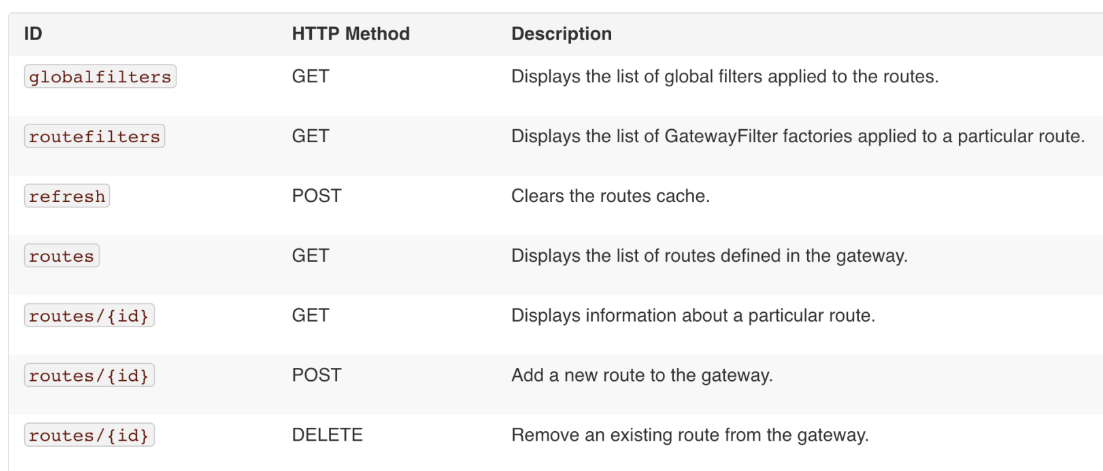
# /actuator/gateway/globalfilters 检索所有global filter
# /actuator/gateway/routefilters 检索所有GatewayFilter factories
# /actuator/gateway/refresh 清理路由缓存
# /actuator/gateway/routes 检索网关中定义的路由
# /actuator/gateway/routes/{id} 获取单个路由的信息
# /gateway/routes/{id_route_to_create} 创建一个路由
# /gateway/routes/{id_route_to_delete} 删除一个路由
工作原理
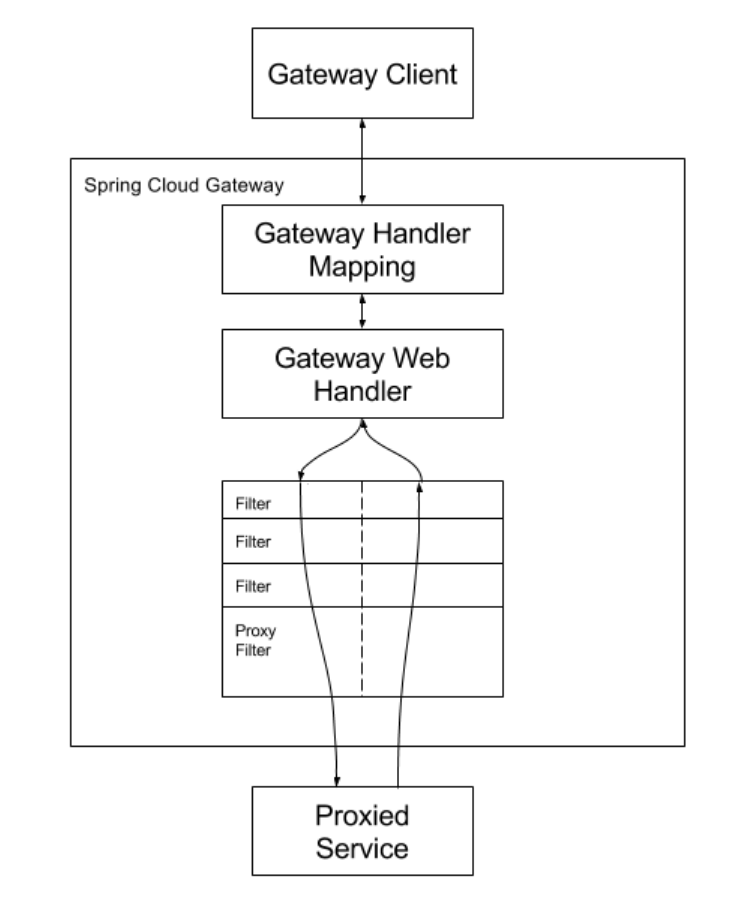
客户端向Spring Cloud Gateway发出请求。
如果Gateway Handler Mapping确定请求与路由匹配,则将其发送到Gateway Web Handler。
此handler通过特定于该请求的过滤器链处理请求。
图中filters被虚线划分的原因是filters可以在发送代理请求之前或之后执行逻辑。
先执行所有“pre filter”逻辑,然后进行请求代理。
在请求代理执行完后,执行“post filter”逻辑
cloud-nacos
注册中心
<!--
	如果要使用Spring Cloud Alibaba 的组件都需要在pom.xml中添加如下的配置
	nacos需要web依赖
-->
<dependencyManagement>
    <dependencies>
        <dependency>
            <groupId>com.alibaba.cloud</groupId>
            <artifactId>spring-cloud-alibaba-dependencies</artifactId>
            <version>2.1.0.RELEASE</version>
            <type>pom</type>
            <scope>import</scope>
        </dependency>
    </dependencies>
</dependencyManagement>

<dependency>
    <groupId>com.alibaba.cloud</groupId>
    <artifactId>spring-cloud-starter-alibaba-nacos-discovery</artifactId>
</dependency>
<dependency>
    <groupId>org.springframework.boot</groupId>
    <artifactId>spring-boot-starter-web</artifactId>
    <version>2.1.7.RELEASE</version>
</dependency>
server:
  port: 8206
spring:
  application:
    name: nacos-user-service
  cloud:
    nacos:
      discovery:
        server-addr: localhost:8848 #配置Nacos地址
management:
  endpoints:
    web:
      exposure:
        include: '*'
配置中心
<dependency>
    <groupId>com.alibaba.cloud</groupId>
    <artifactId>spring-cloud-starter-alibaba-nacos-config</artifactId>
</dependency>
<dependency>
    <groupId>com.alibaba.cloud</groupId>
    <artifactId>spring-cloud-starter-alibaba-nacos-discovery</artifactId>
</dependency>
# application.yaml
spring:
  profiles:
    active: dev
# bootstrap.yaml
server:
  port: 9101
spring:
  application:
    name: nacos-config-client
  cloud:
    nacos:
      discovery:
        server-addr: localhost:8848 #Nacos地址
      config:
        server-addr: localhost:8848 #Nacos地址
        file-extension: yaml #这里我们获取的yaml格式的配置
配置文件加载顺序
优先级
-- 优先级
a < b1 < b2 < c1 < c2 < d1 < d2 < e < f
-- 各级别描述
a:application.properties
b1:bootstrap.properties
b2:bootstrap-{profile}.properties
c1:通过 spring.cloud.nacos.config.shared-configs[1].data-id 支持多个共享 Data Id 的配置
c2:通过 spring.cloud.nacos.config.shared-configs[n].data-id 支持多个共享 Data Id 的配置
d1:通过 spring.cloud.nacos.config.extension-configs[0].data-id 支持多个扩展 Data Id 的配置
d2:通过 spring.cloud.nacos.config.extension-configs[n].data-id 支持多个扩展 Data Id 的配置
e:通过内部相关规则(应用名、应用名+ Profile )自动生成相关的 Data Id 配置 ,如 scrm-base-service.properties
f:VM option
nacos三级配置优先级
-- nacos三级配置优先级
三级配置的优先级如下:主配置 > 扩展配置 > 共享配置
-- 三级配置描述
-- 主配置(默认${spring.application.name}.properties)(不会被同名属性覆盖)
${prefix}-${spring.profiles.active}.${file-extension}
首先会去指定namespace和group下加载指定dataId(带后缀),如果加载不到,会继续加载dataId(不带后缀)
-- 共享配置和扩展配置区别
nacos对配置的默认理念(namespace区分环境,group区分不同应用)
1.主配置是应用专有的配置(因此,主配置应当在dataId上要区分,同时最好还要有 group 的区分)
2.要在各应用之间共享一个配置,请使用上面的 shared-configs
3.如果要在特定范围内(比如某个应用上)覆盖某个共享dataId上的特定属性,请使用 extension-configs
bootstrap和application
-- 详细描述(bootstrap和application)
bootstrap.yml用于ApplicationContext引导阶段。由父Spring ApplicationContext加载。定义系统级别的参数配置,这些参数一般不会变动。
application.yml 用来定义应用级别的参数配置。搭配 spring-cloud-config 使用时application.yml定义的参数可以实现动态替换。
application.yml 会覆盖 bootstrap.yml 的参数配置。
-- applicaiton加载(默认会从4个路径去找application配置)
假设当前运行目录为/: /config > / > classpath:/config > classpath:/
自己测试优先级
1. nacos配置中心主配置 覆盖 springboot加载的application.yaml
2. application.yml 覆盖 bootstrap.yml 的参数配置。
cloud-sentinel
-- Sentinel特性
熔断降级

-- 下载地址
https://github.com/alibaba/Sentinel/releases

-- 启动jar,默认8080
java -jar sentinel-dashboard-1.6.3.jar
java -Dserver.port=9999 -Dcsp.sentinel.dashboard.server=localhost:8080 -Dproject.name=sentinel-dashboard -jar sentinel-dashboard-1.8.6.jar

-- 访问,账号密码sentinel
http://localhost:9000

-- Sentinel采用的懒加载规则,需要我们先访问下接口,Sentinel控制台中才会有对应服务信息
取消懒加载 :sentinel.eager: true

-- nacos存储参数解释
resource:资源名称;
limitApp:来源应用;
grade:阈值类型,0表示线程数,1表示QPS;
count:单机阈值;
strategy:流控模式,0表示直接,1表示关联,2表示链路;
controlBehavior:流控效果,0表示快速失败,1表示Warm Up,2表示排队等待;
clusterMode:是否集群;
<!--sentinel 限流熔点降级-->
<dependency>
    <groupId>com.alibaba.cloud</groupId>
    <artifactId>spring-cloud-alibaba-sentinel-gateway</artifactId>
</dependency>
<dependency>
    <groupId>com.alibaba.cloud</groupId>
    <artifactId>spring-cloud-starter-alibaba-sentinel</artifactId>
</dependency>
<!-- sentinel集成nacos作为数据源 -->
<dependency>
    <groupId>com.alibaba.csp</groupId>
    <artifactId>sentinel-datasource-nacos</artifactId>
</dependency>
spring:
 cloud:
 #Sentinel配置
  sentinel:
   transport:
    dashboard: localhost:9000
   # 支持链路限流
   web-context-unify: false
   # Sentinel 网关流控默认的粒度是 route 维度以及自定义 API 分组维度,默认不支持 URL 粒度
   filter:
    enabled: false
   # Sentinel控制台懒加载-开启饥饿
   eager: true
   datasource:
    #流控规则
    flow: # 指定数据源名称
     # 指定nacos数据源
     nacos:
      server-addr: ${hmh.nacos.server-addr}
      # 指定配置文件
      dataId: ${spring.application.name}-flow-rules
      # 指定分组
      groupId: SENTINEL_GROUP
      # 指定配置文件规则类型
      rule-type: flow
      # 指定配置文件数据格式
      data-type: json
    #降级规则
    degrade:
     nacos:
      server-addr: ${hmh.nacos.server-addr}
      dataId: ${spring.application.name}-degrade-rules
      groupId: SENTINEL_GROUP
      rule-type: degrade
      data-type: json
    #系统规则
    system:
     nacos:
      server-addr: ${hmh.nacos.server-addr}
      dataId: ${spring.application.name}-system-rules
      groupId: SENTINEL_GROUP
      rule-type: system
      data-type: json
    #授权规则
    authority:
     nacos:
      server-addr: ${hmh.nacos.server-addr}
      dataId: ${spring.application.name}-authority-rules
      groupId: SENTINEL_GROUP
      rule-type: authority
      data-type: json
    #热点参数
    param-flow:
     nacos:
      server-addr: ${hmh.nacos.server-addr}
      dataId: ${spring.application.name}-param-flow-rules
      groupId: SENTINEL_GROUP
      rule-type: param-flow
      data-type: json
    #网关流控规则
    gw-flow:
     nacos:
      server-addr: ${hmh.nacos.server-addr}
      dataId: ${spring.application.name}-flow-rules
      groupId: SENTINEL_GROUP
      rule-type: gw-flow
      data-type: json
    #API流控规则
    gw-api-group:
     nacos:
      server-addr: ${hmh.nacos.server-addr}
      dataId: ${spring.application.name}-api-rules
      groupId: SENTINEL_GROUP
      rule-type: gw-api-group
      data-type: json
限流
-- Sentinel Starter 默认为所有的 HTTP 服务提供了限流埋点,我们也可以通过使用@SentinelResource来自定义一些限流行为
/**
 * 限流功能
 * 用于测试熔断和限流功能.
 */
@RestController
@RequestMapping("/rateLimit")
public class RateLimitController {

    /**
     * 按资源名称限流,需要指定限流处理逻辑
     */
    @GetMapping("/byResource")
    @SentinelResource(value = "byResource",blockHandler = "handleException")
    public CommonResult byResource() {
        return new CommonResult("按资源名称限流", 200);
    }

    /**
     * 按URL限流,有默认的限流处理逻辑
     */
    @GetMapping("/byUrl")
    @SentinelResource(value = "byUrl",blockHandler = "handleException")
    public CommonResult byUrl() {
        return new CommonResult("按url限流", 200);
    }

    public CommonResult handleException(BlockException exception){
        return new CommonResult(exception.getClass().getCanonicalName(),200);
    }

}
根据资源名称限流
-- 在Sentinel控制台配置流控规则,根据@SentinelResource注解的value值,如:
[
    {
        "resource": "byResource",
        "limitApp": "default",
        "grade": 1,
        "count": 1,
        "strategy": 0,
        "controlBehavior": 0,
        "clusterMode": false
    }
]
根据URL限流
-- 在Sentinel控制台配置流控规则,使用访问的URL,如:
[
    {
        "resource": "/rateLimit/byUrl",
        "limitApp": "default",
        "grade": 1,
        "count": 1,
        "strategy": 0,
        "controlBehavior": 0,
        "clusterMode": false
    }
]
熔断功能
RestTemplate调用方式
/**
 * Created by macro on 2019/8/29.
 */
@Configuration
public class RibbonConfig {

    @Bean
    @SentinelRestTemplate
    public RestTemplate restTemplate(){
        return new RestTemplate();
    }
}
/**
 * 熔断功能
 * Created by macro on 2019/11/7.
 */
@RestController
@RequestMapping("/breaker")
public class CircleBreakerController {

    private Logger LOGGER = LoggerFactory.getLogger(CircleBreakerController.class);
    @Autowired
    private RestTemplate restTemplate;
    @Value("${service-url.user-service}")
    private String userServiceUrl;

    @RequestMapping("/fallback/{id}")
    @SentinelResource(value = "fallback",fallback = "handleFallback")
    public CommonResult fallback(@PathVariable Long id) {
        return restTemplate.getForObject(userServiceUrl + "/user/{1}", CommonResult.class, id);
    }

    //忽略空指针异常
    @RequestMapping("/fallbackException/{id}")
    @SentinelResource(value = "fallbackException",fallback = "handleFallback2", exceptionsToIgnore = {NullPointerException.class})
    public CommonResult fallbackException(@PathVariable Long id) {
        if (id == 1) {
            throw new IndexOutOfBoundsException();
        } else if (id == 2) {
            throw new NullPointerException();
        }
        return restTemplate.getForObject(userServiceUrl + "/user/{1}", CommonResult.class, id);
    }

    public CommonResult handleFallback(Long id) {
        User defaultUser = new User(-1L, "defaultUser", "123456");
        return new CommonResult<>(defaultUser,"服务降级返回",200);
    }

    public CommonResult handleFallback2(@PathVariable Long id, Throwable e) {
        LOGGER.error("handleFallback2 id:{},throwable class:{}", id, e.getClass());
        User defaultUser = new User(-2L, "defaultUser2", "123456");
        return new CommonResult<>(defaultUser,"服务降级返回",200);
    }
}
feign调用方式
<!-- 在启动类加Enable注解-->
<dependency>
    <groupId>org.springframework.cloud</groupId>
    <artifactId>spring-cloud-starter-openfeign</artifactId>
</dependency>
feign:
  sentinel:
    enabled: true #打开sentinel对feign的支持
/**
 * feign接口
 */
@FeignClient(value = "nacos-user-service",fallback = UserFallbackService.class)
public interface UserService {
    @PostMapping("/user/create")
    CommonResult create(@RequestBody User user);

    @GetMapping("/user/{id}")
    CommonResult<User> getUser(@PathVariable Long id);

    @GetMapping("/user/getByUsername")
    CommonResult<User> getByUsername(@RequestParam String username);

    @PostMapping("/user/update")
    CommonResult update(@RequestBody User user);

    @PostMapping("/user/delete/{id}")
    CommonResult delete(@PathVariable Long id);
}
/**
 * 降级操作
 */
@Component
public class UserFallbackService implements UserService {
    @Override
    public CommonResult create(User user) {
        User defaultUser = new User(-1L, "defaultUser", "123456");
        return new CommonResult<>(defaultUser,"服务降级返回",200);
    }

    @Override
    public CommonResult<User> getUser(Long id) {
        User defaultUser = new User(-1L, "defaultUser", "123456");
        return new CommonResult<>(defaultUser,"服务降级返回",200);
    }

    @Override
    public CommonResult<User> getByUsername(String username) {
        User defaultUser = new User(-1L, "defaultUser", "123456");
        return new CommonResult<>(defaultUser,"服务降级返回",200);
    }

    @Override
    public CommonResult update(User user) {
        return new CommonResult("调用失败,服务被降级",500);
    }

    @Override
    public CommonResult delete(Long id) {
        return new CommonResult("调用失败,服务被降级",500);
    }
}
cloud-seata
-- 在微服务架构中由于全局数据一致性没法保证产生的问题就是分布式事务问题。简单来说,一次业务操作需要操作多个数据源或需要进行远程调用,就会产生分布式事务问题

-- Seata 是一款开源的分布式事务解决方案,致力于提供高性能和简单易用的分布式事务服务。Seata 将为用户提供了 AT、TCC、SAGA 和 XA 事务模式,为用户打造一站式的分布式解决方案

-- 三个组件
Transaction Coordinator (TC): 事务协调器,维护全局事务的运行状态,负责协调并驱动全局事务的提交或回滚;
Transaction Manager (TM): 控制全局事务的边界,负责开启一个全局事务,并最终发起全局提交或全局回滚的决议;
Resource Manager (RM): 控制分支事务,负责分支注册、状态汇报,并接收事务协调器的指令,驱动分支(本地)事务的提交和回滚

-- 简单过程
1、TM 向 TC 申请开启一个全局事务,全局事务创建成功并生成一个全局唯一的 XID;
2、XID 在微服务调用链路的上下文中传播;
3、RM 向 TC 注册分支事务,将其纳入 XID 对应全局事务的管辖;
4、TM 向 TC 发起针对 XID 的全局提交或回滚决议;
5、TC 调度 XID 下管辖的全部分支事务完成提交或回滚请求。
搭建seata服务端
-- 下载地址
https://github.com/seata/seata/releases

-- 使用nacos作为注册中心
## file.config
## transaction log store, only used in seata-server
store {
  ## store mode: file、db、redis
  mode = "db"
  ## rsa decryption public key
  publicKey = ""
  ## database store property
  db {
    ## the implement of javax.sql.DataSource, such as DruidDataSource(druid)/BasicDataSource(dbcp)/HikariDataSource(hikari) etc.
    datasource = "dbcp"
    ## mysql/oracle/postgresql/h2/oceanbase etc.
    dbType = "mysql"
    driverClassName = "com.mysql.jdbc.Driver"
    ## if using mysql to store the data, recommend add rewriteBatchedStatements=true in jdbc connection param
    url = "jdbc:mysql://127.0.0.1:3306/seata-server?rewriteBatchedStatements=true"
    user = "root"
    password = "root"
    minConn = 5
    maxConn = 100
    globalTable = "global_table"
    branchTable = "branch_table"
    lockTable = "lock_table"
    queryLimit = 100
    maxWait = 5000
  }
}
# registry.conf
registry {
  # file 、nacos 、eureka、redis、zk、consul、etcd3、sofa
  type = "nacos"
  nacos {
    application = "seata-server"
    serverAddr = "127.0.0.1:8848"
    group = "DEFAULT_GROUP"
    namespace = ""
    cluster = "default"
    username = "nacos"
    password = "nacos"
  }
}
config {
  # file、nacos 、apollo、zk、consul、etcd3
  type = "file"
  file {
    name = "file.conf"
  }
}
客户端
<properties>
    <java.version>1.8</java.version>
    <spring-cloud-alibaba.version>2.2.7.RELEASE</spring-cloud-alibaba.version>
    <springboot.version>2.2.12.RELEASE</springboot.version>
    <lombok.version>1.18.8</lombok.version>
    <project.build.sourceEncoding>UTF-8</project.build.sourceEncoding>
    <sikpTests>true</sikpTests>
    <maven-source-plugin.version>3.0.1</maven-source-plugin.version>
    <maven-surefire-plugin.version>2.22.1</maven-surefire-plugin.version>
    <seata.version>1.4.2</seata.version>
    <mybatis-plus-boot-starter.version>3.3.0</mybatis-plus-boot-starter.version>
</properties>
<dependencies>
    <!--nacos-->
    <dependency>
        <groupId>com.alibaba.cloud</groupId>
        <artifactId>spring-cloud-starter-alibaba-nacos-discovery</artifactId>
    </dependency>
    <!--seata-->
    <dependency>
        <groupId>com.alibaba.cloud</groupId>
        <artifactId>spring-cloud-starter-alibaba-seata</artifactId>
        <version>${spring-cloud-alibaba.version}</version>
    </dependency>
    <dependency>
        <groupId>io.seata</groupId>
        <artifactId>seata-spring-boot-starter</artifactId>
        <version>1.4.2</version>
    </dependency>
    <!-- mybatis -->
    <dependency>
        <groupId>com.baomidou</groupId>
        <artifactId>mybatis-plus-boot-starter</artifactId>
        <version>${mybatis-plus-boot-starter.version}</version>
    </dependency>
    <dependency>
        <groupId>mysql</groupId>
        <artifactId>mysql-connector-java</artifactId>
    </dependency>
    <!--feign-->
    <dependency>
        <groupId>org.springframework.cloud</groupId>
        <artifactId>spring-cloud-starter-openfeign</artifactId>
        <version>2.2.6.RELEASE</version>
    </dependency>
</dependencies>
<dependencyManagement>
    <dependencies>
        <dependency>
            <groupId>org.springframework.boot</groupId>
            <artifactId>spring-boot-dependencies</artifactId>
            <version>${springboot.version}</version>
            <type>pom</type>
            <scope>import</scope>
        </dependency>
        <!--Spring Cloud Alibaba-->
        <dependency>
            <groupId>com.alibaba.cloud</groupId>
            <artifactId>spring-cloud-alibaba-dependencies</artifactId>
            <version>${spring-cloud-alibaba.version}</version>
            <type>pom</type>
            <scope>import</scope>
        </dependency>
        <dependency>
            <groupId>org.projectlombok</groupId>
            <artifactId>lombok</artifactId>
            <version>${lombok.version}</version>
        </dependency>
        <dependency>
            <groupId>mysql</groupId>
            <artifactId>mysql-connector-java</artifactId>
            <version>8.0.28</version>
        </dependency>
        <dependency>
            <groupId>com.alibaba.spring</groupId>
            <artifactId>spring-context-support</artifactId>
            <version>1.0.11</version>
        </dependency>
    </dependencies>
</dependencyManagement>
server:
 port: 8182
spring:
 application:
  name: seata-account-service
 cloud:
  nacos:
   discovery:
    server-addr: 127.0.0.1:8848
 datasource:
  driverClassName: com.mysql.jdbc.Driver
  password: root
  url: jdbc:mysql://localhost:3306/seat-account?allowMultiQueries=true
  username: root
logging:
 level:
  io:
   seata: info
mybatis:
 mapperLocations: classpath:mapper/*.xml
seata:
 tx-service-group: my_test_tx_group
-- 注解使用
@GlobalTransactional(name = "fsp-create-order",rollbackFor = Exception.class)
cloud-oauth2
OAuth2相关名词
-- OAuth2相关名词解释
Resource owner(资源拥有者):拥有该资源的最终用户,他有访问资源的账号密码;
Resource server(资源服务器):服务提供商存放用户生成的资源的服务器。与认证服务器是不同的逻辑节点,但是在物理上,双方是可以在一起的。拥有受保护资源的服务器,如果请求包含正确的访问令牌,可以访问资源;
Client(客户端):访问资源的客户端,会使用访问令牌去获取资源服务器的资源,可以是浏览器、移动设备或者服务器;
Authorization server(认证服务器):服务提供商专门用来处理认证的服务器。用于认证用户的服务器,如果客户端认证通过,发放访问资源服务器的令牌。
Http Service:服务提供商,也就是持有Resource Server的存在方。可以理解为类似微信,钉钉这样具备用户信息的服务者。
User Agent:用户代理,一般就是指的浏览器。
客户端凭证:Client Id和密码用于认证用户。
访问令牌:授权服务提供者在接收到用户请求后,颁发的访问令牌。
刷新令牌(Refresh Token):用于获取一个新的令牌。由于令牌的有效期比较短,一旦失效,用户需要再获取令牌的流程是比较繁琐的。为了提升用户体验,可以使用reflesh_token来获取新的令牌。


Client Credentials(客户端模式):客户端直接通过客户端认证(比如client_id和client_secret)从认证服务器获取访问令牌。
四种授权模式
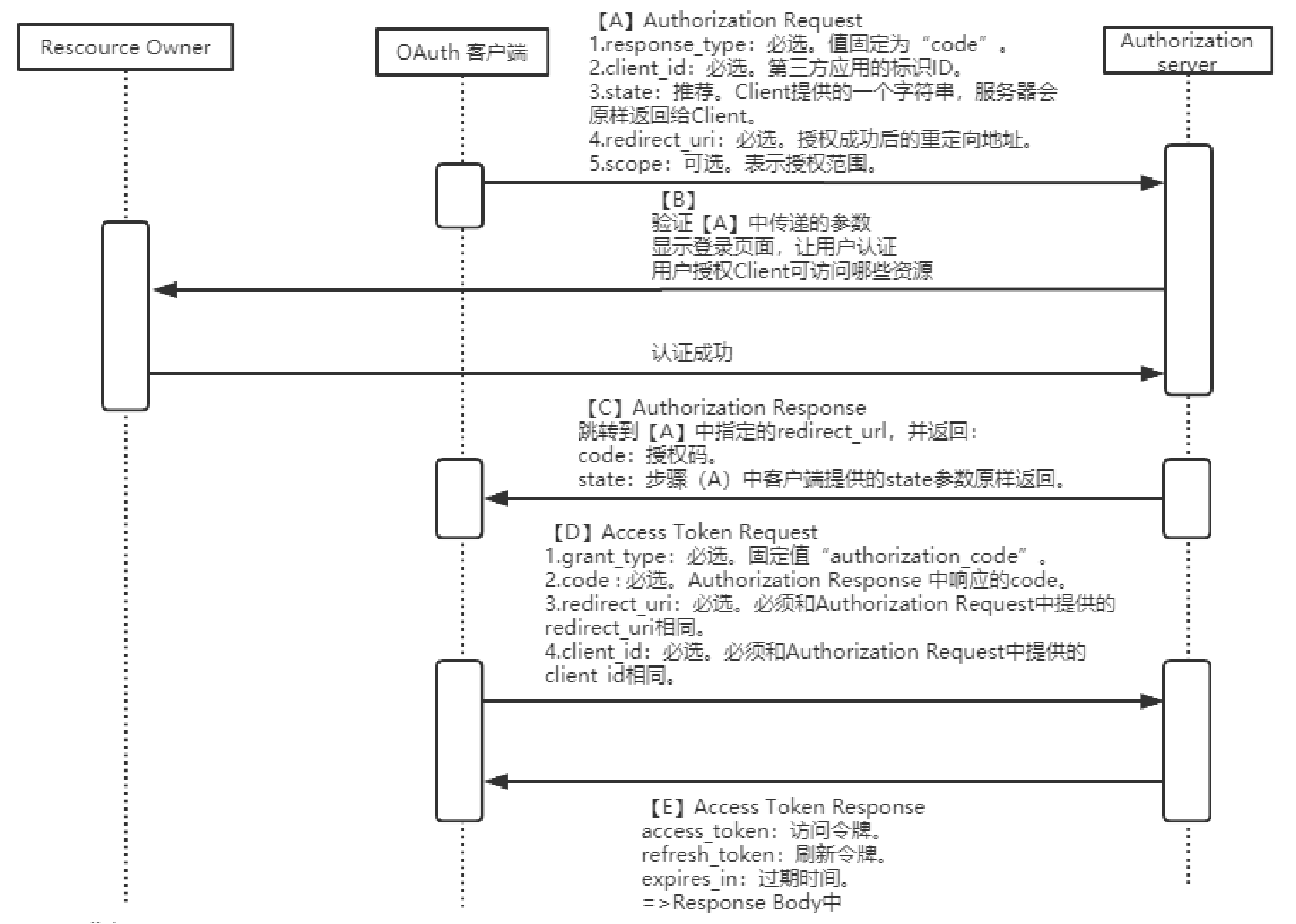
Authorization Code(授权码模式)
1、用户登录应用系统,请求跳转到认证服务器,并302返回登录认证页面;
2、用户输入账户+密码进行认证,认证服务器认证通过返回code给应用系统;
3、应用系统携带code向认证服务器换取访问令牌,认证服务器验证Client ID,code等信息,给应用系统发送访问令牌;
4、应用系统携带访问令牌查询用户登录信息,认证服务器返回用户信息,如用户名;
5、应用系统验证用户名正确,创建会话,并跳转到redirect url
Implicit(简化模式)
省略掉了颁发授权码(Authorization Code)给客户端的过程,直接返回访问令牌和可选的刷新令牌。其适用于没有Server服务器来接受处理Authorization Code的第三方应用。适用于公开的浏览器单页应用
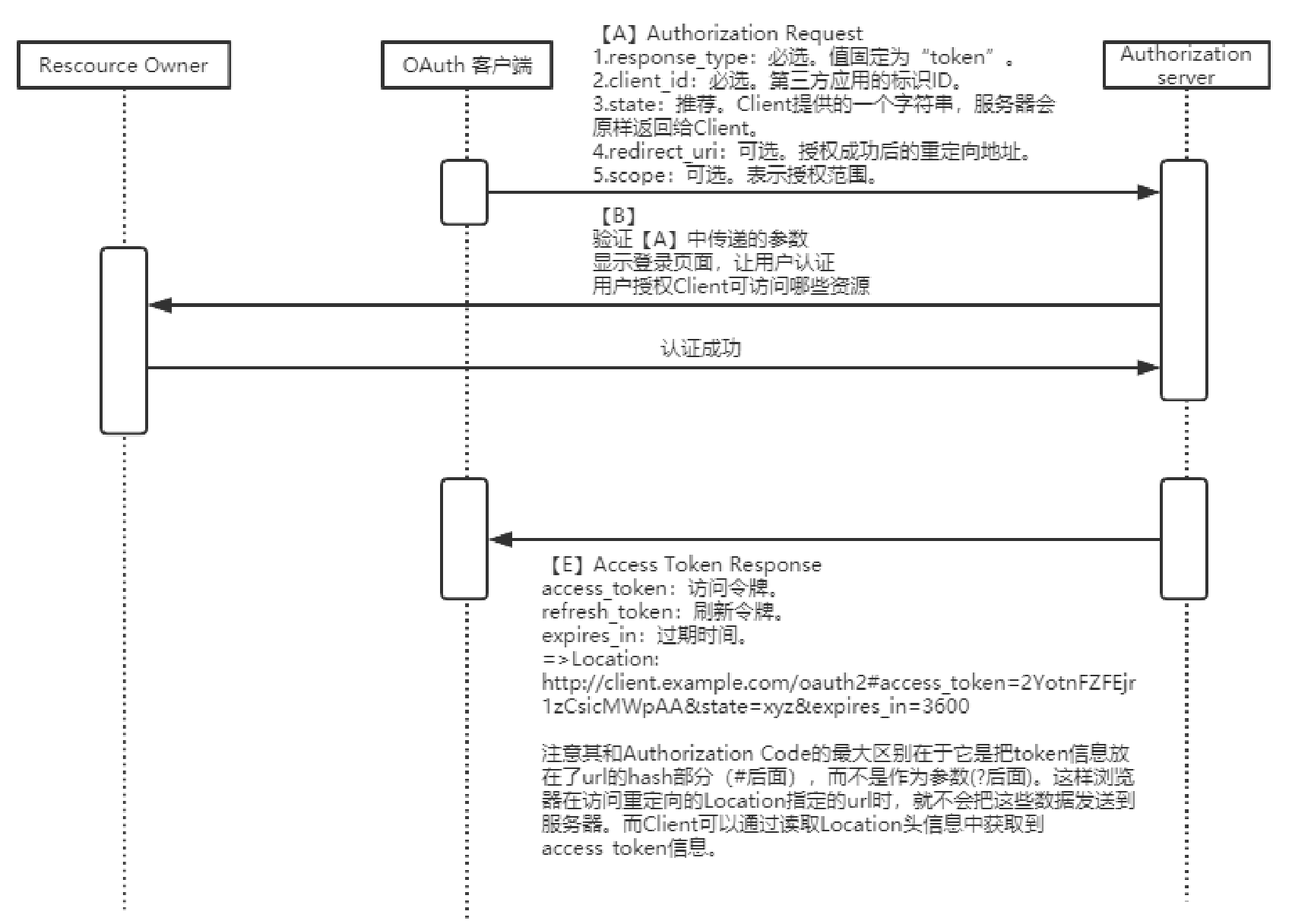
密码模式
这种模式再一步简化,和Authorzation Code类型下重要的区分就是省略了Authorization Request和Authorization Response。而是Client直接使用Resource owner提供的username和password来直接请求access_token(直接发起Access Token Request然后返回Access Token Response信息)。这种模式一般适用于Resource server高度信任第三方Client的情况下
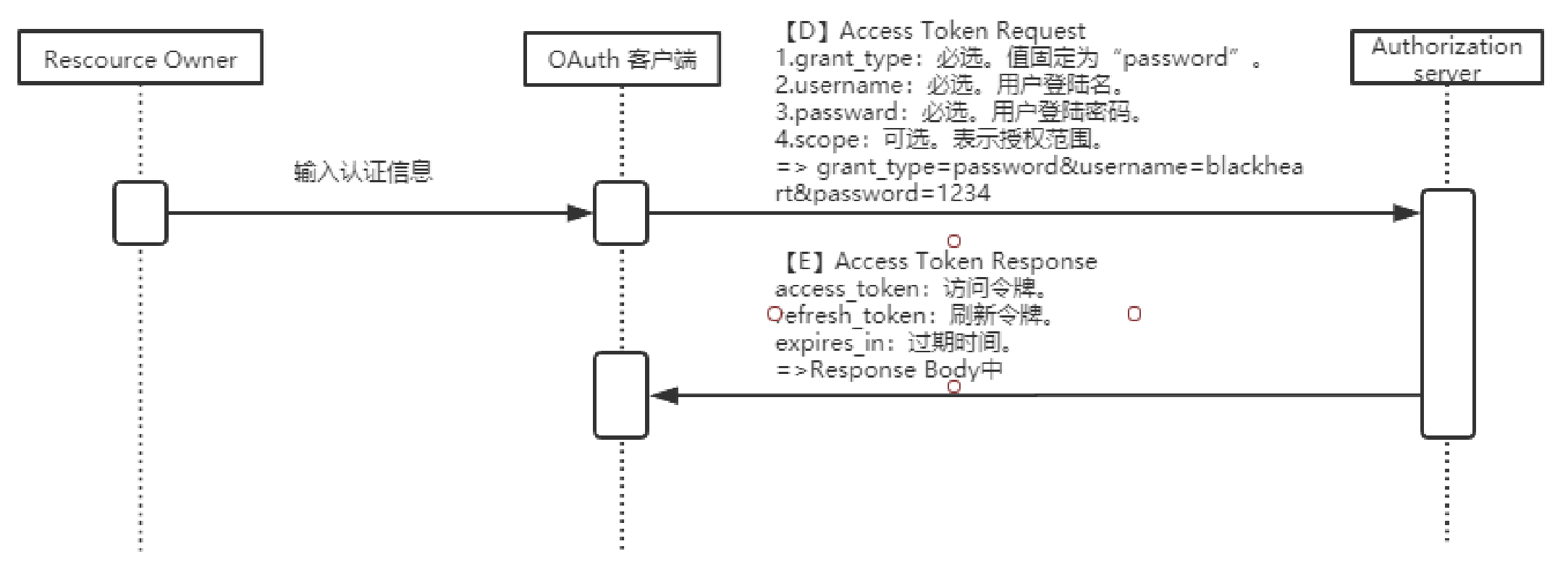
Client Credentials(客户端模式)
Client直接以自己的名义而不是Resource owner的名义去要求访问Resource server的一些受保护资源
适用于服务器间通信场景,直接根据client的ID和密钥即可获取token,无需用户参与
这种模式比较合适消费api的后端服务,比如拉取一组用户信息等
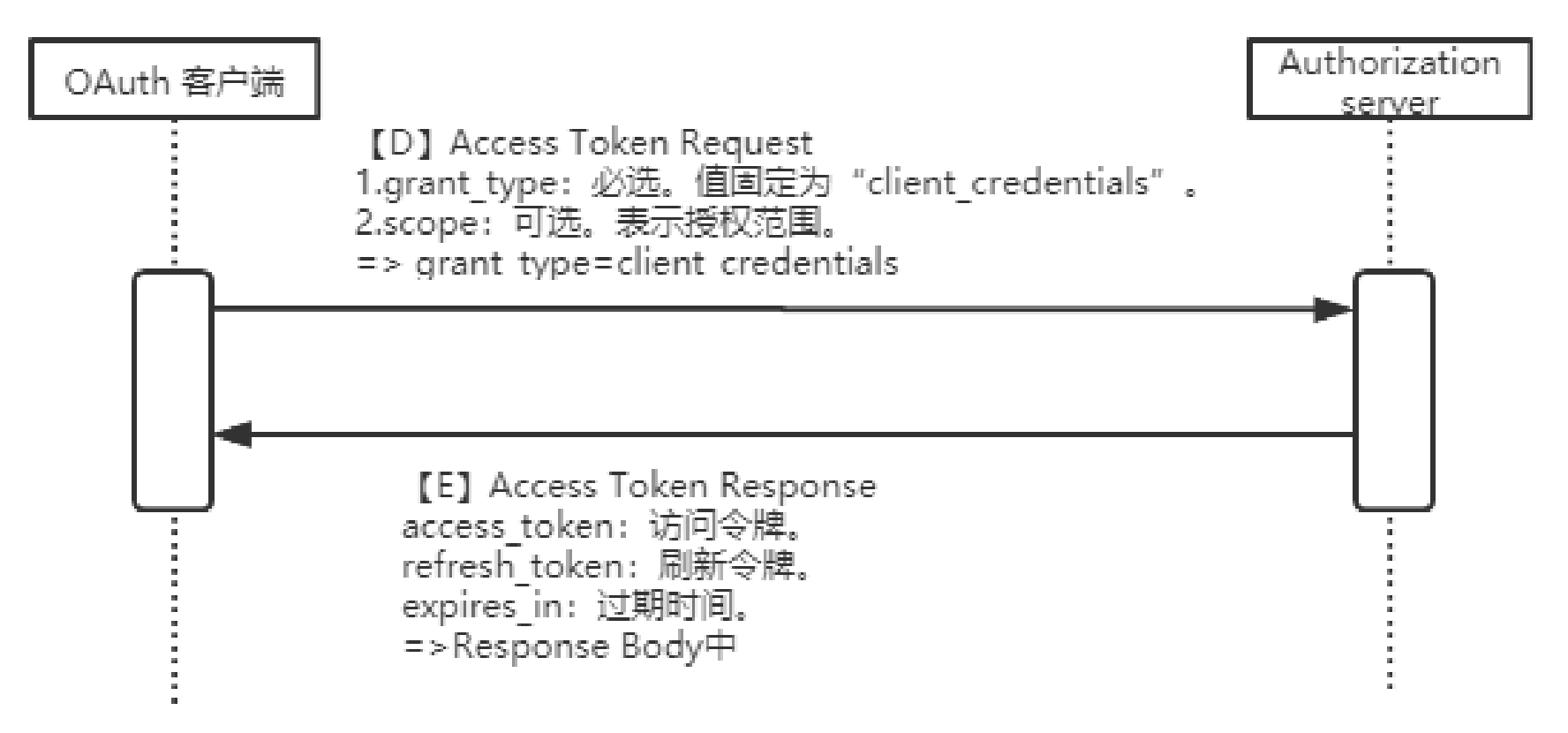
刷新令牌
以便在访问令牌过期失效的时候可以由客户端自动获取新的访问令牌,而不是让用户再次登录授权
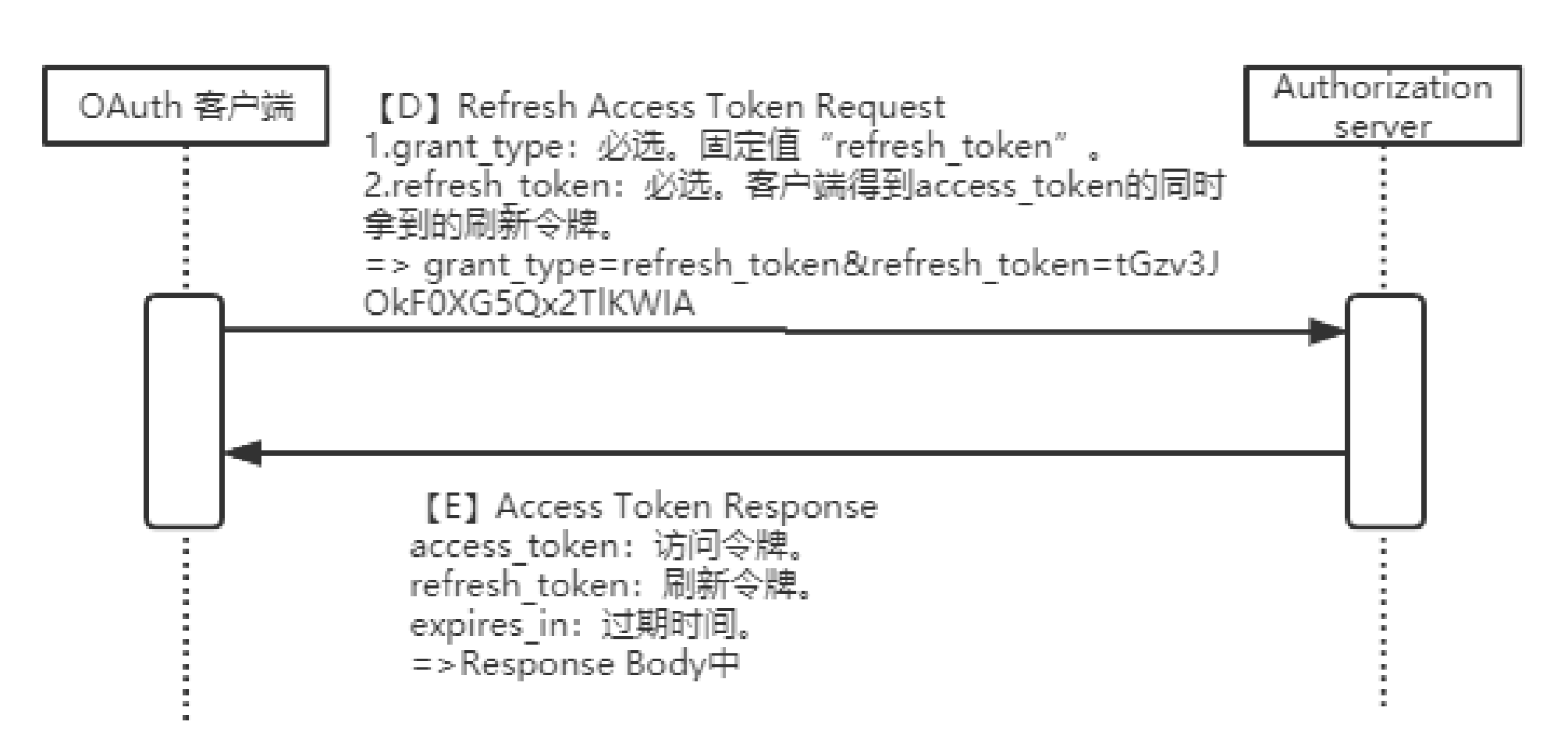
入门使用
<dependency>
    <groupId>org.springframework.cloud</groupId>
    <artifactId>spring-cloud-starter-oauth2</artifactId>
</dependency>
<dependency>
    <groupId>org.springframework.cloud</groupId>
    <artifactId>spring-cloud-starter-security</artifactId>
</dependency>
//加载用户信息
/**
 * Created by macro on 2019/9/30.
 */
@Service
public class UserService implements UserDetailsService {
    private List<User> userList;
    @Autowired
    private PasswordEncoder passwordEncoder;

    @PostConstruct
    public void initData() {
        String password = passwordEncoder.encode("123456");
        userList = new ArrayList<>();
        userList.add(new User("macro", password, AuthorityUtils.commaSeparatedStringToAuthorityList("admin")));
        userList.add(new User("andy", password, AuthorityUtils.commaSeparatedStringToAuthorityList("client")));
        userList.add(new User("mark", password, AuthorityUtils.commaSeparatedStringToAuthorityList("client")));
    }

    @Override
    public UserDetails loadUserByUsername(String username) throws UsernameNotFoundException {
        List<User> findUserList = userList.stream().filter(user -> user.getUsername().equals(username)).collect(Collectors.toList());
        if (!CollectionUtils.isEmpty(findUserList)) {
            return findUserList.get(0);
        } else {
            throw new UsernameNotFoundException("用户名或密码错误");
        }
    }
}
//认证服务器配置,并开启认证
/**
 * 认证服务器配置
 * Created by macro on 2019/9/30.
 */
@Configuration
@EnableAuthorizationServer
public class AuthorizationServerConfig extends AuthorizationServerConfigurerAdapter {

    @Autowired
    private PasswordEncoder passwordEncoder;

    @Autowired
    private AuthenticationManager authenticationManager;

    @Autowired
    private UserService userService;

    /**
     * 使用密码模式需要配置
     */
    @Override
    public void configure(AuthorizationServerEndpointsConfigurer endpoints) {
        endpoints.authenticationManager(authenticationManager)
                .userDetailsService(userService);
    }
    @Override
    public void configure(ClientDetailsServiceConfigurer clients) throws Exception {
        clients.inMemory()
                //配置client_id
                .withClient("admin")
                //配置client_secret
                .secret(passwordEncoder.encode("admin123456"))
                //配置访问token的有效期
                .accessTokenValiditySeconds(3600)
                //配置刷新token的有效期
                .refreshTokenValiditySeconds(864000)
                //配置redirect_uri,用于授权成功后跳转
                .redirectUris("http://www.baidu.com")
                //配置申请的权限范围
                .scopes("all")
                //配置grant_type,表示授权类型
                .authorizedGrantTypes("authorization_code","password");
    }
}
//资源服务器配置,并开启
/**
 * 资源服务器配置
 * Created by macro on 2019/9/30.
 */
@Configuration
@EnableResourceServer
public class ResourceServerConfig extends ResourceServerConfigurerAdapter {

    @Override
    public void configure(HttpSecurity http) throws Exception {
        http.authorizeRequests()
                .anyRequest()
                .authenticated()
                .and()
                .requestMatchers()
            	//配置需要保护的资源路径
                .antMatchers("/user/**");
    }
}
//security配置,允许认证相关路径的访问及表单登录,并开启
/**
 * SpringSecurity配置
 * Created by macro on 2019/10/8.
 */
@Configuration
@EnableWebSecurity
public class SecurityConfig extends WebSecurityConfigurerAdapter {

    @Bean
    public PasswordEncoder passwordEncoder() {
        return new BCryptPasswordEncoder();
    }

    @Bean
    @Override
    public AuthenticationManager authenticationManagerBean() throws Exception {
        return super.authenticationManagerBean();
    }

    @Override
    public void configure(HttpSecurity http) throws Exception {
        http.csrf()
                .disable()
                .authorizeRequests()
                .antMatchers("/oauth/**", "/login/**", "/logout/**")
                .permitAll()
                .anyRequest()
                .authenticated()
                .and()
                .formLogin()
                .permitAll();
    }
}
//测试接口
@RestController
@RequestMapping("/user")
public class UserController {
    @GetMapping("/getCurrentUser")
    public Object getCurrentUser(Authentication authentication) {
        return authentication.getPrincipal();
    }
}
-- 授权码登录
1、进行登录授权
http://localhost:9401/oauth/authorize?response_type=code&client_id=admin&redirect_uri=http://www.baidu.com&scope=all&state=normal
2、进行授权操作
选择Approve,会得到一个授权码code
3、获取访问令牌
http://localhost:9401/oauth/token
Authorization:Basic Auth  input username and password
Formdata:
code:授权码
grant_type:authorization_code
client_id:admin
redirect_uri:http://www.baidu.com
scope:all

-- 密码模式登录
1、使用密码请求该地址获取访问令牌
http://localhost:9401/oauth/token
Authorization:Basic Auth  input username and password
Formdata:
grant_type:password
scope:all
username:macro
password:123456

-- 测试接口
http://localhost:9401/user/getCurrentUser
Authorization:bearer 访问令牌
存储令牌
使用Redis存储令牌
<dependency>
    <groupId>org.springframework.boot</groupId>
    <artifactId>spring-boot-starter-data-redis</artifactId>
</dependency>
/**
 * 使用redis存储token的配置
 * Created by macro on 2019/10/8.
 */
@Configuration
public class RedisTokenStoreConfig {

    @Autowired
    private RedisConnectionFactory redisConnectionFactory;

    @Bean
    public TokenStore redisTokenStore (){
        return new RedisTokenStore(redisConnectionFactory);
    }
}
//认证配置指定存储策略为redis
@Configuration
@EnableAuthorizationServer
public class AuthorizationServerConfig extends AuthorizationServerConfigurerAdapter {
    @Autowired
    private PasswordEncoder passwordEncoder;

    @Autowired
    private AuthenticationManager authenticationManager;

    @Autowired
    private UserService userService;

    @Autowired
    @Qualifier("redisTokenStore")
    private TokenStore tokenStore;

    /**
     * 使用密码模式需要配置
     */
    @Override
    public void configure(AuthorizationServerEndpointsConfigurer endpoints) {
        endpoints.authenticationManager(authenticationManager)
                .userDetailsService(userService)
                .tokenStore(tokenStore);//配置令牌存储策略
    }
}
-- 测试
使用password方式获取令牌,访问http://localhost:9401/oauth/token
使用jwt存储令牌
/**
 * 使用Jwt存储token的配置
 * Created by macro on 2019/10/8.
 */
@Configuration
public class JwtTokenStoreConfig {

    @Bean
    public TokenStore jwtTokenStore() {
        return new JwtTokenStore(jwtAccessTokenConverter());
    }

    @Bean
    public JwtAccessTokenConverter jwtAccessTokenConverter() {
        JwtAccessTokenConverter accessTokenConverter = new JwtAccessTokenConverter();
        accessTokenConverter.setSigningKey("test_key");//配置JWT使用的秘钥
        return accessTokenConverter;
    }
}
//认证配置指定存储策略为jwt
@Configuration
@EnableAuthorizationServer
public class AuthorizationServerConfig extends AuthorizationServerConfigurerAdapter {
    @Autowired
    private PasswordEncoder passwordEncoder;

    @Autowired
    private AuthenticationManager authenticationManager;

    @Autowired
    private UserService userService;

    @Autowired
    @Qualifier("jwtTokenStore")
    private TokenStore tokenStore;

    @Autowired
    private JwtAccessTokenConverter jwtAccessTokenConverter;

    /**
     * 使用密码模式需要配置
     */
    @Override
    public void configure(AuthorizationServerEndpointsConfigurer endpoints) {
        endpoints.authenticationManager(authenticationManager)
                .userDetailsService(userService)
                .tokenStore(tokenStore)//配置令牌存储策略
                .accessTokenConverter(jwtAccessTokenConverter);
    }
}
扩展jwt存储内容
/**
 * Jwt内容增强器
 * Created by macro on 2019/10/8.
 */
public class JwtTokenEnhancer implements TokenEnhancer {
    @Override
    public OAuth2AccessToken enhance(OAuth2AccessToken accessToken, OAuth2Authentication authentication) {
        //扩展存储的信息
        Map<String, Object> info = new HashMap<>();
        info.put("enhance", "enhance info");
        ((DefaultOAuth2AccessToken) accessToken).setAdditionalInformation(info);
        return accessToken;
    }
}

@Bean
public JwtTokenEnhancer jwtTokenEnhancer() {
    return new JwtTokenEnhancer();
}
/**
 * 认证服务器配置
 * Created by macro on 2019/9/30.
 */
@Configuration
@EnableAuthorizationServer
public class AuthorizationServerConfig extends AuthorizationServerConfigurerAdapter {
    @Autowired
    private JwtTokenEnhancer jwtTokenEnhancer;
    /**
     * 使用密码模式需要配置
     */
    @Override
    public void configure(AuthorizationServerEndpointsConfigurer endpoints) {
        TokenEnhancerChain enhancerChain = new TokenEnhancerChain();
        List<TokenEnhancer> delegates = new ArrayList<>();
        delegates.add(jwtTokenEnhancer); //配置JWT的内容增强器
        delegates.add(jwtAccessTokenConverter);
        enhancerChain.setTokenEnhancers(delegates);
        endpoints.authenticationManager(authenticationManager)
                .userDetailsService(userService)
                .tokenStore(tokenStore) //配置令牌存储策略
                .accessTokenConverter(jwtAccessTokenConverter)
                .tokenEnhancer(enhancerChain);
    }
}
解析jwt
<dependency>
    <groupId>io.jsonwebtoken</groupId>
    <artifactId>jjwt</artifactId>
    <version>0.9.0</version>
</dependency>
@RestController
@RequestMapping("/user")
public class UserController {
    @GetMapping("/getCurrentUser")
    public Object getCurrentUser(Authentication authentication, HttpServletRequest request) {
        String header = request.getHeader("Authorization");
        String token = StrUtil.subAfter(header, "bearer ", false);
        return Jwts.parser()
                .setSigningKey("test_key".getBytes(StandardCharsets.UTF_8))
                .parseClaimsJws(token)
                .getBody();
    }
}
刷新令牌
/**
 * 认证服务器配置
 * Created by macro on 2019/9/30.
 */
@Configuration
@EnableAuthorizationServer
public class AuthorizationServerConfig extends AuthorizationServerConfigurerAdapter {
    @Override
    public void configure(ClientDetailsServiceConfigurer clients) throws Exception {
        clients.inMemory()
                .withClient("admin")
                .secret(passwordEncoder.encode("admin123456"))
                .accessTokenValiditySeconds(3600)
                .refreshTokenValiditySeconds(864000)
                .redirectUris("http://www.baidu.com")
                .autoApprove(true) //自动授权配置
                .scopes("all")
                .authorizedGrantTypes("authorization_code","password","refresh_token"); //添加授权模式
    }
}
-- 用刷新令牌模式来获取新的令牌
携带参数grant_type=refresh_token & refresh_token={}
单点登录
-- 单点登录(Single Sign On)指的是当有多个系统需要登录时,用户只需登录一个系统,就可以访问其他需要登录的系统而无需登录

-- 当我们在oauth2-jwt-server服务上登录以后,就可以直接访问oauth2-client需要登录的接口
<dependency>
    <groupId>org.springframework.cloud</groupId>
    <artifactId>spring-cloud-starter-oauth2</artifactId>
</dependency>
<dependency>
    <groupId>org.springframework.cloud</groupId>
    <artifactId>spring-cloud-starter-security</artifactId>
</dependency>
<dependency>
    <groupId>org.springframework.boot</groupId>
    <artifactId>spring-boot-starter-web</artifactId>
</dependency>
<dependency>
    <groupId>io.jsonwebtoken</groupId>
    <artifactId>jjwt</artifactId>
    <version>0.9.0</version>
</dependency>
server:
  port: 9501
  servlet:
    session:
      cookie:
        name: OAUTH2-CLIENT-SESSIONID #防止Cookie冲突,冲突会导致登录验证不通过
oauth2-server-url: http://localhost:9401
spring:
  application:
    name: oauth2-client
security:
  oauth2: #与oauth2-server对应的配置
    client:
      client-id: admin
      client-secret: admin123456
      user-authorization-uri: ${oauth2-server-url}/oauth/authorize
      access-token-uri: ${oauth2-server-url}/oauth/token
    resource:
      jwt:
        key-uri: ${oauth2-server-url}/oauth/token_key
@EnableOAuth2Sso
@SpringBootApplication
public class Oauth2ClientApplication {
    public static void main(String[] args) {
        SpringApplication.run(Oauth2ClientApplication.class, args);
    }
}
/**
 * 认证服务器配置
 * Created by macro on 2019/9/30.
 */
@Configuration
@EnableAuthorizationServer
public class AuthorizationServerConfig extends AuthorizationServerConfigurerAdapter {
    @Override
    public void configure(ClientDetailsServiceConfigurer clients) throws Exception {
        clients.inMemory()
                .withClient("admin")
                .secret(passwordEncoder.encode("admin123456"))
                .accessTokenValiditySeconds(3600)
                .refreshTokenValiditySeconds(864000)
            	//单点登录时配置
                .redirectUris("http://localhost:9501/login")
            	//自动授权配置
            	.autoApprove(true)
                .scopes("all")
                .authorizedGrantTypes("authorization_code","password","refresh_token");
    }
    @Override
    public void configure(AuthorizationServerSecurityConfigurer security) {
        // 获取密钥需要身份认证,使用单点登录时必须配置
        security.tokenKeyAccess("isAuthenticated()");
    }
}
权限认证
/**
 * 在接口上配置权限时使用
 * Created by macro on 2019/10/11.
 */
@Configuration
@EnableGlobalMethodSecurity(prePostEnabled = true)
@Order(101)
public class SecurityConfig extends WebSecurityConfigurerAdapter {
}
/**
 * Created by macro on 2019/9/30.
 */
@RestController
@RequestMapping("/user")
public class UserController {
    @PreAuthorize("hasAuthority('admin')")
    @GetMapping("/auth/admin")
    public Object adminAuth() {
        return "Has admin auth!";
    }
}
cloud-admin
服务端
<dependency>
    <groupId>org.springframework.boot</groupId>
    <artifactId>spring-boot-starter-web</artifactId>
</dependency>
<dependency>
    <groupId>de.codecentric</groupId>
    <artifactId>spring-boot-admin-starter-server</artifactId>
</dependency>
spring:
  application:
    name: admin-server
server:
  port: 9301
@EnableAdminServer
@SpringBootApplication
public class AdminServerApplication {
    public static void main(String[] args) {
        SpringApplication.run(AdminServerApplication.class, args);
    }
}
客户端
<dependency>
    <groupId>org.springframework.boot</groupId>
    <artifactId>spring-boot-starter-web</artifactId>
</dependency>
<dependency>
    <groupId>de.codecentric</groupId>
    <artifactId>spring-boot-admin-starter-client</artifactId>
</dependency>
spring:
  application:
    name: admin-client
  boot:
    admin:
      client:
        url: http://localhost:9301 #配置admin-server地址
server:
  port: 9305
management:
  endpoints:
    web:
      exposure:
        include: '*'
  endpoint:
    health:
      show-details: always
logging:
  file: admin-client.log #添加开启admin的日志监控
SkyWalking链路追踪
-- 部署学习地址
https://www.iocoder.cn/SkyWalking/install/
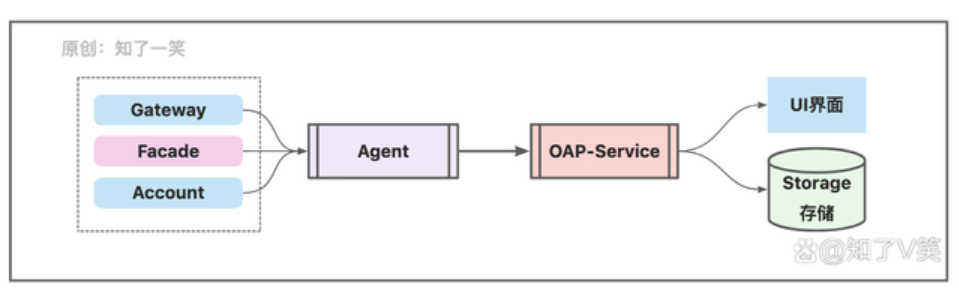
-- 业务机制
SpringCloud:分布式系统中的服务,启动时配置代理即可;
Agent:以探针的方式进行请求链路的数据采集,并向管理服务上报;
OAP-Service:接收数据,完成数据的存储和展示;
Storage:数据的存储层,支持ElasticSearch、Mysql、H2多种方式;
UI界面:数据的可视化展示界面;
-- 工作流程
springboot启动,配置agent地址,并设置agent连接的OAP地址,OAP配置存储地址(如elastic)
服务通过探针的方式接入数据采集的功能,之后请求链路的相关处理行为会上报到OAP服务中,进行数据的聚合管理和分析,并存储在持久层,然后可以通过UI界面进行可视化呈现

-- 安装部署
skywalking在之前的旧版本中,apm与agent是在一个包中的,在9.0的版本中是需要分开下载的;agent包下载解压之后,也将其放到apm包下面维护
-- 配置存储方式
config/application.yml
storage:
  selector: ${SW_STORAGE:elasticsearch}
  elasticsearch:
    namespace: ${SW_NAMESPACE:""}
    clusterNodes: ${SW_STORAGE_ES_CLUSTER_NODES:175.178.164.134:9200}
-- 启动
Windows 直接点击bin/startup.bat
-- 涉及网关
将optional-plugins目录下面的apm-spring-cloud-gateway-3.x-plugin-8.12.0.jar 和apm-spring-webflux-5.x-plugin-8.12.0.jar两个包拷贝到plugins目录下面去
-- 服务添加配置
在服务启动类中添加agent配置,如果在生产环境中,通常会统一在脚本中设置,由于在本地环境演示,基于IDEA工具进行管理
-javaagent:D:\hayes\software-0329\apache-skywalking-apm-bin\agent\skywalking-agent.jar
-Dskywalking.agent.service_name=hmh-cloud-gateway
-Dskywalking.collector.backend_service=127.0.0.1:11800