工具-IDEA
插件
代码规范
- Alibaba Java Coding Guidelines
- CheckStyle-IDEA
- QAPlug、QAPlug-Checkstyle、QAPlug-FindBugs、QAPlug-PMD
- Sonarlint
- Statictic
Dao工具
- EasyCode
- MyBatisCodeHelperPro
- MybatisX
- Free MyBatis plugin
- Mybatis Log Plugin
实体类
- lombok
- GenerateAllSetter
- GsonFormat
- GsonFormatPlus
- POJO to JSON
翻译
- Translation
日志
- Grep Console
Maven
- Maven Helper
热部署
- JRebel and XRebel
- 魔法方式地址
curl https://register.jpy.wang/ReRegister/src/main/java/jrebel/JrebelMain.java -o tmp.java && java tmp.java && del tmp.java
- JRebel mybatisPlus extension
缩略图
- CodeGlance
- CodeGlance Pro
括号显示
- Rainbow Brackets
- HighlightBracketPair
Git
- GitToolBox
- Git Commit Message Helper
- .ignore
字符串
- String Manipulation
- CamelCase
接口
- Apifox Helper
- Apipost Helper V2
图表
- SequenceDiagram
- PlantUML Integration
- ExcelReader
- CSV Editor
字节码
- jclasslib Bytecode Viewer
正则表达式
- any-rule
监控
- VisualVM Launcher
其他插件
| 插件名称 | 功能描述 |
|---|---|
| Tabnine AI Code Completion | AI代码补全 |
| Codota AI Autocomplete | Java和JavaScript的代码提示 |
| IntelliJ IDEA Help | idea离线文档 |
| WeChat Mini Program Support | 支持微信小程序或QQ小程序项目 |
| WeChat weapp Support | 支持微信app项目 |
| AceJump | 代替鼠标 |
| ideaVim | 模拟Vim的操作方式 |
| Codota | 代码提示,方法使用提示 |
| Properties to YAML Converter | properties文件转成yaml文件,右击文件 |
| activate-power-mode | 敲代码震动效果 |
| Key Promoter X | 显示对应的快捷键 |
| IDE Features Trainer | idea基础学习 |
| Squaretest | 生成测试用例 |
| TestMe | 生成测试用例 |
| IDE Features Trainer | IDEA工具学习 |
| Atom Material Icons | 好看的图标 |
| IntelliVue | Vue功能增强 |
| Ini | ini文件支持 |
| MapStruct Support | MapStruct工具支持 |
| Statictic | 统计代码行数 |
| .env files support | .env文件支持 |
| AWS Toolkit | 亚马逊云上传协议工具 |
快捷键
操作快捷
| 快捷键 | 功能描述 |
|---|---|
ctrl + alt + m | 提取方法 |
ctrl + r | 局部替换 |
ctrl + alt + t | 包裹代码 |
ctrl + shift + r | 全局替换 |
ctrl + shift + u | 转大小写 |
ctrl + shift + v | 从历史粘贴 |
alt + ↑/↓ | 上/下一个方法 |
Ctrl + Tab | 切换活动文件 |
Ctrl + E | 最近的文件 |
多选行快捷
| 快捷键 | 功能描述 |
|---|---|
双击Ctrl+↑/↓ | 向上/下克隆插入符号 |
Alt+Shift+G | 将插入符号添加到选择中的每一行 |
Alt+J | 选择单位下次出现的位置 |
Alt+Shift+J | 取消最后一次选择 |
Ctrl+Alt+Shift+J | 选择所有出现的位置 |
折叠代码
| 快捷键 | 功能描述 |
|---|---|
Ctrl + - | 折叠当前代码块 |
Ctrl + + | 展开当前代码块 |
Ctrl + Shift + - | 折叠所有代码块 |
Ctrl + Shift + + | 展开所有代码块 |
idea免安装配置
-- idea免安装版配置 /bin/idea.properties

-- 默认配置存储路径

C:\\${user}\AppData\Roaming\JetBrains

idea.config.path=D:/hayes/Idea2021.3.2/hayes/config

idea.system.path=D:/hayes/Idea2021.3.2/hayes/system

idea.plugins.path=${idea.config.path}/plugins

idea.log.path=${idea.system.path}/log
常用设置
-
使用滚轮调节字体大小:Settings>>Editor>>General 下的 Change font size with Command + Mouse Wheel
-
自动导包 :Settings>>Editor>>General>>Auto Import
-
开启连字 :Settings>>Editor>>Font 下的 Enable Ligatures
-
配置注释 :
- Settings>>Editor>>File and Code Templates下的模板设置:
/**
 * ${description}
 *
 * @author hmh
 * @since ${YEAR}年${MONTH}月${DAY}日${HOUR}:${MINUTE}:${SECOND}
*/- Live Templates下的模板设置:
/**
 * $description$
 *
 * @author Alan
 * @since $date$
*/ -
显示方法分割线 :
- Settings>>Editor>>General>>Appearance 下的 Show method separators
-
行注释设置,不从行首开始,在代码之前:
- Settings>>Code Style>>Java>>Code Generation
- 去掉
Line comment at first column和Block comment at first column。 - 勾上
Add a space at common start
generated.http
-- 请求头和请求参数空一行

POST http://localhost:9992/order/generateOrder

Content-Type: application/json


{


}
too long设置
总是显示too long报错问题

.idea下的workspace.xml

<component name="PropertiesComponent">中添加

<property name="dynamic.classpath" value="true" />
取消检查设置
IDEA的代码分析包含两个部分,Syntax(语法分析)和Inspections(语言修改建议),这两个功能在修改和查看大文件时是最占CPU的。Syntax部分是不能全局关闭的,但Inspections是可以的:
- 在Perferences -> Inspections,点Copy,复制一份,名称任意。
- 然后点击下面工具栏中的Reset to empty。保存。
对行数特别多的个别文件,还可以禁用Syntax来提高速度:
- 在编辑器状态栏中,右上角或右击滚动条,可以看到有3个级别
- 选None就关闭了所有提示和分析了,这个只能对单个文件逐个设置。
IDEA总是提示登录github
在File|Settings|Version Control|Git中勾选Use credential helper(使用凭证助手)即可解决这个问题。
IDEA导入Eclipse项目
导入项目
-
点击左上角的File → New → Project from Existing Sources。
-
选择要导入的Eclipse项目的文件夹路径,并点击“OK”。
-
先勾选Import project from external model,选择Eclipse项目,点击Next。
-
无需设置,直接点击Next。
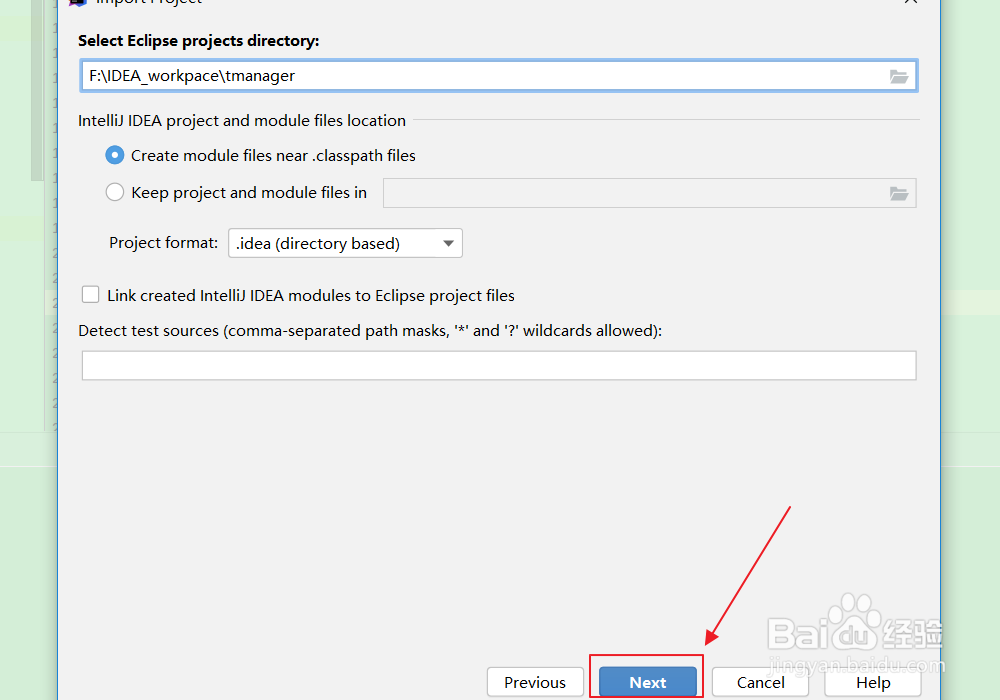
-
Select Eclipse projects to import,继续点击Next。
-
Use default project code style,继续点击Next。
-
select project SDK。之后点击Finish。
-
遇到上述所说问题,本Eclipse项目所用Java版本为1.6,而之前配置的是1.8版本,所以提示找不到对应的jdks,先点击ok进入,等待项目导入
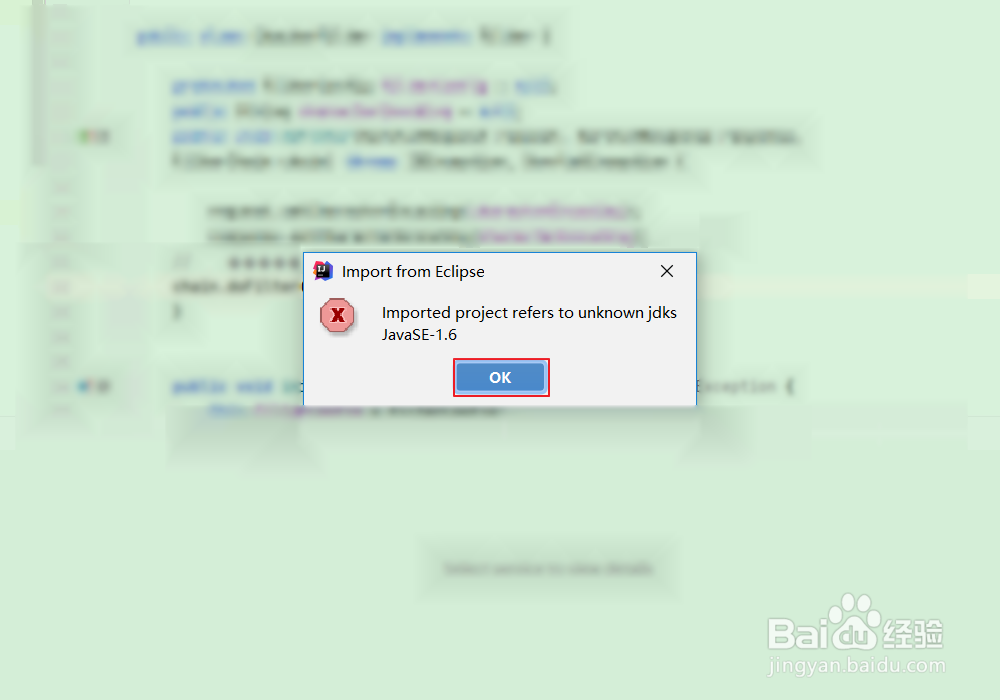
-
现在我们来设置JDK版本,点击左上角的File→Project Structure。
-
在Project SDK中选择1.8版本,点击Apply,再点击OK。
-
接着点击左上角File→Settings。
-
在左上方搜索框内输入“compiler”(也可在左侧栏中直接找到Java compiler),选中Java compiler,点击Target bytecode version右侧的“+”号,之后选中tmanager(你的项目名)后 且 在下拉菜单中选择版本“8”,点击“ok”。
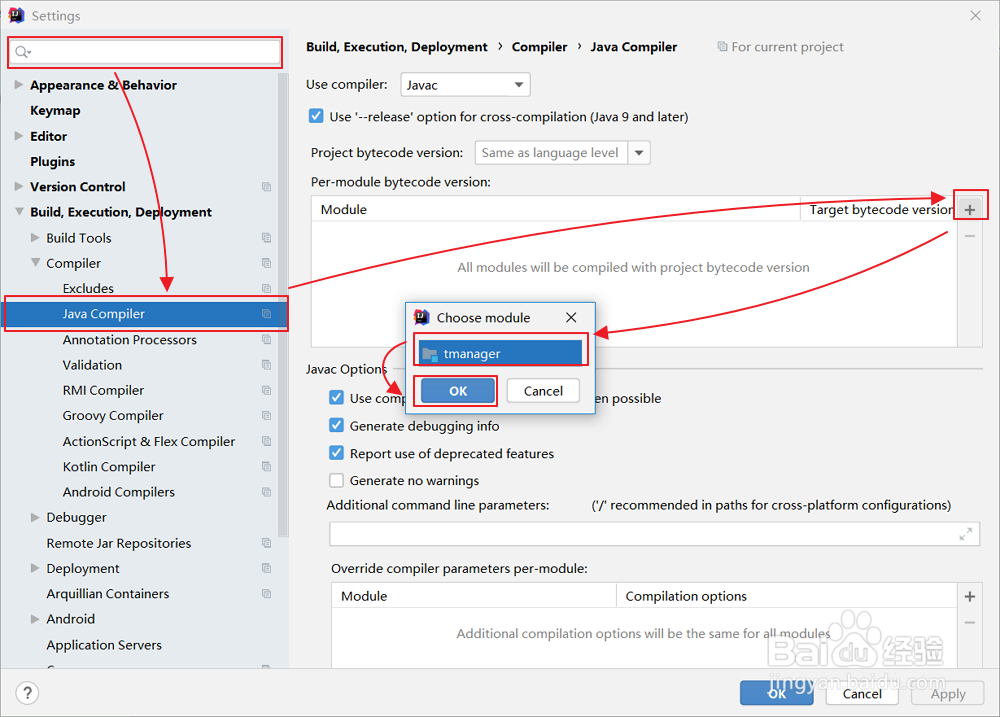
导入依赖
-
在IDEA中,点击左上角的File→Project Structure。
-
选中左侧栏Modules,选中tmanager(你的项目名),在Module SDK处选择1.8版本并把右侧红名的依赖(eclipse相关)全部右键→remove。
-
然后点击如图所示的“+”号,点击JARs or directories。
-
找到你的lib包所在位置并选择它,然后点击ok。(如果你是Maven管理的项目,此步骤可跳过)
-
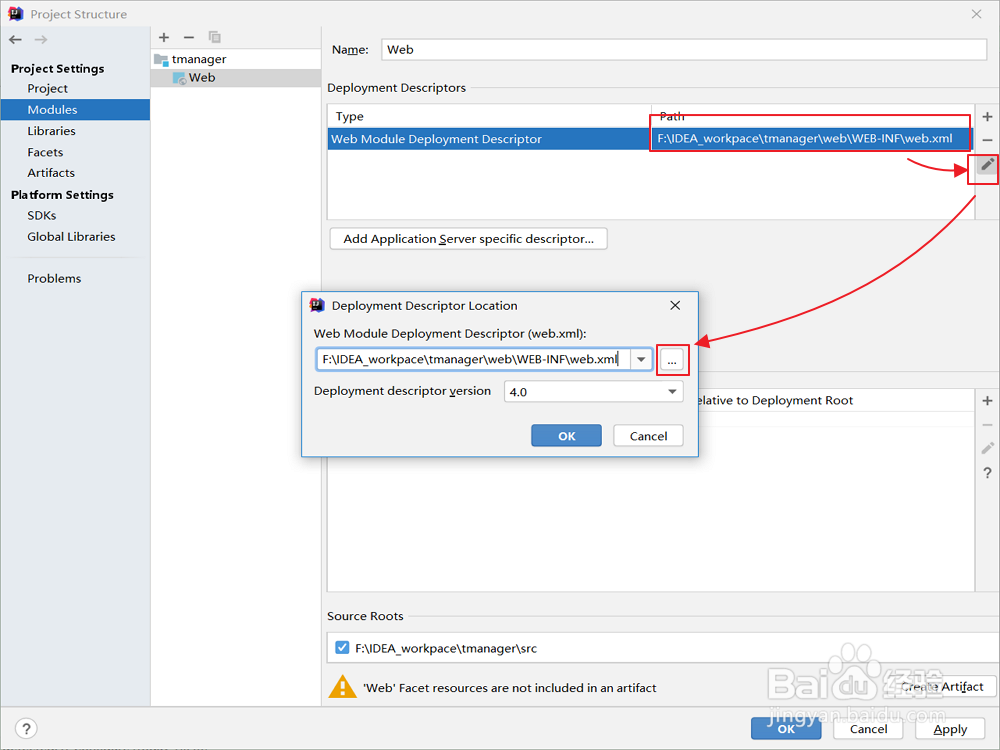
如果你的项目是web项目,则还需要手动定位web.xml。同样的窗口,在左侧栏选择Facets→“+”→Web。
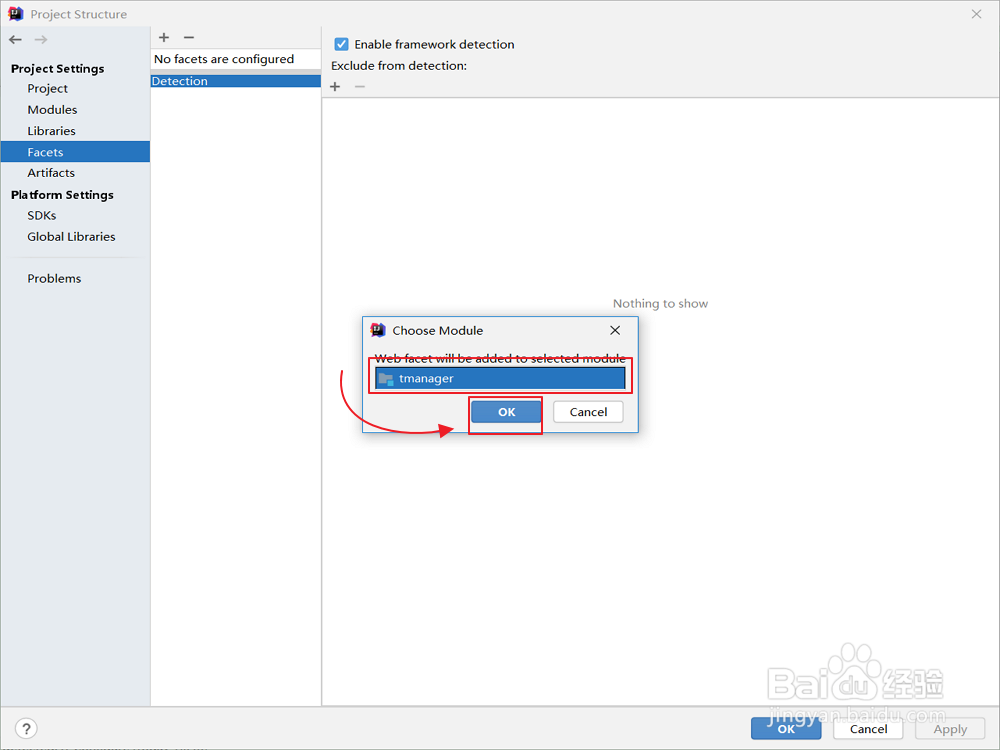
- 之后选中如图所示的路径,点击右侧图书按钮,在中间框中点击“...”来编辑web.xml的路径。
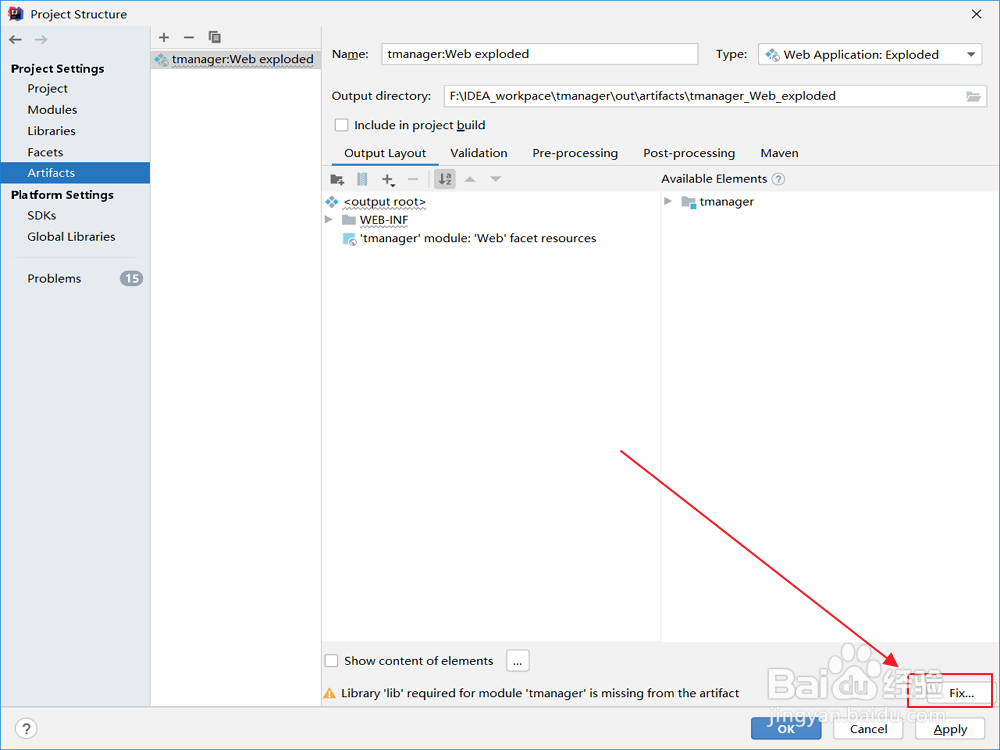
- 添加Artifacts。
配置服务器
-
点击右上角的“Add configuration”。
-
点击左上角“+”,选择Tomcat Server→Local。
-
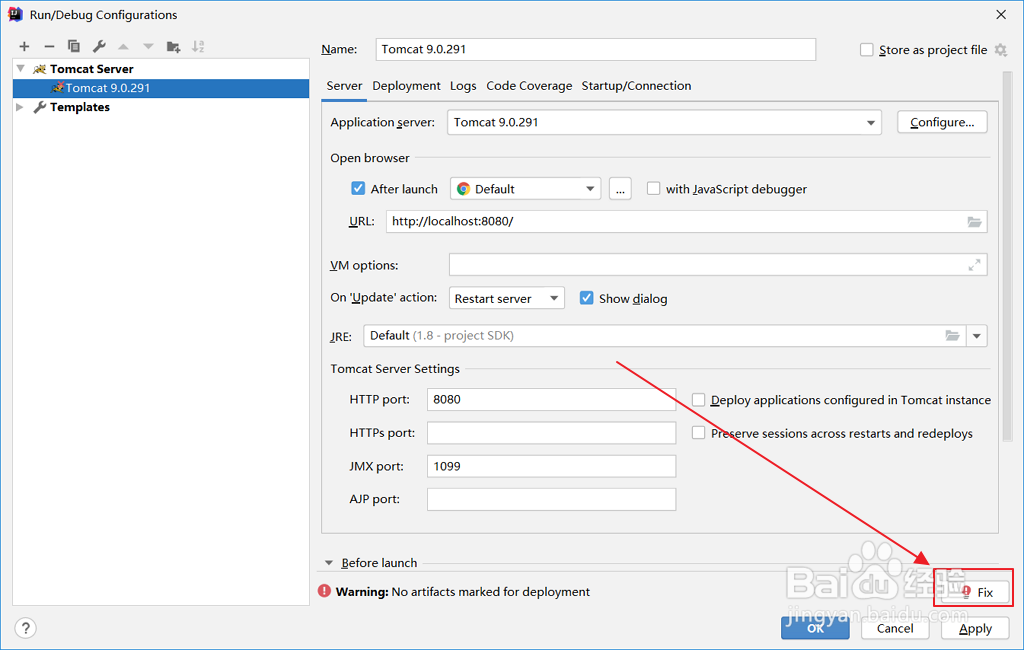
之后点击右下角Fix。跳转到Deployment配置artifacts。
- 进入Project Structure,如图所示选择Modules→tmanager(你的项目名)→“+”。
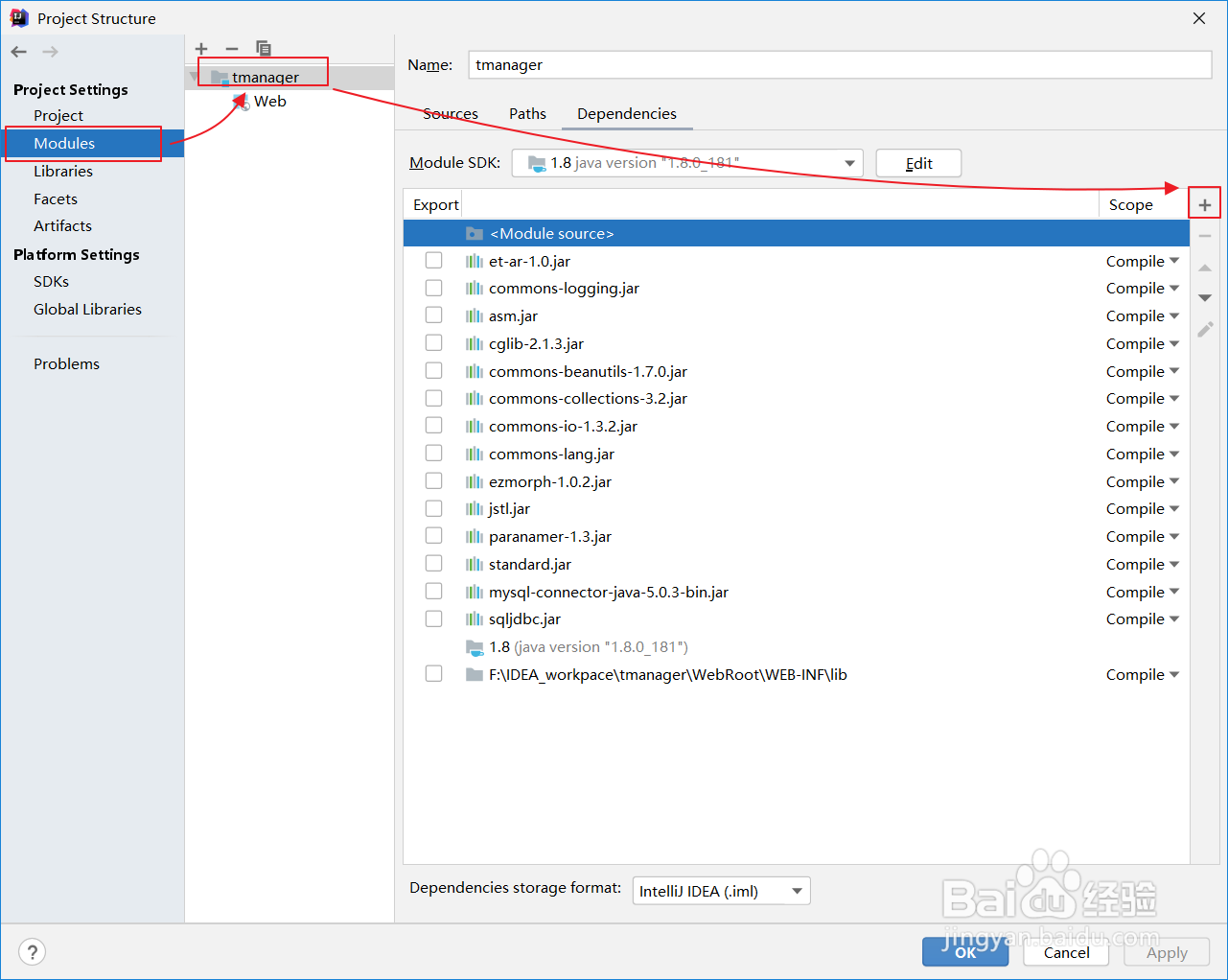
- 点击Library。选择配置好的tomcat版本,然后点击Add selected,点击ok保存。
其它问题
- 如果IDEA日志不打印,则需要配置日志文件 log4j.properties。
# 配置参数:[level], appenderName1, appenderName2, ...
# level:DEBUG, INFO, WARN, ERROR, FATAL
log4j.rootLogger=info, stdout, info, error

log4j.logger.org.hibernate=info, stdout, info, error
log4j.logger.org.springframework=info, stdout, info, error

log4j.appender.stdout=org.apache.log4j.ConsoleAppender
log4j.appender.stdout.layout=org.apache.log4j.PatternLayout
log4j.appender.stdout.datePattern='.'yyyy-MM-dd'.log'
log4j.appender.stdout.Threshold=DEBUG
log4j.appender.stdout.MaxFileSize=500MB
log4j.appender.stdout.layout.ConversionPattern=[%d{yyyy-MM-dd HH:mm:ss}] - %c - %p: %m%n

log4j.logger.info=info
log4j.appender.info=org.apache.log4j.DailyRollingFileAppender
log4j.appender.info.layout=org.apache.log4j.PatternLayout
#log4j.appender.info.layout.ConversionPattern=[%-5p] [%d{HH:mm:ss}] %c - %m%n
log4j.appender.info.layout.ConversionPattern=[%d{yyyy-MM-dd HH:mm:ss}] - %c - %p: %m%n
log4j.appender.info.DatePattern='.'yyyy-MM-dd'.log'
log4j.appender.info.encoding=UTF-8
log4j.appender.info.Threshold=INFO
log4j.appender.info.append=TRUE
log4j.appender.info.ImmediateFlush=TRUE
log4j.appender.info.File=${catalina.base}/logs/iptv5.log

log4j.logger.error=info
log4j.appender.error=org.apache.log4j.DailyRollingFileAppender
log4j.appender.error.layout=org.apache.log4j.PatternLayout
#log4j.appender.error.layout.ConversionPattern=[%-5p] [%d{HH:mm:ss}] %c - %m%n
log4j.appender.error.layout.ConversionPattern=[%d{yyyy-MM-dd HH:mm:ss}] - %c - %p: %m%n
log4j.appender.error.DatePattern='.'yyyy-MM-dd'.log'
log4j.appender.error.encoding=UTF-8
log4j.appender.error.Threshold=ERROR
log4j.appender.error.append=TRUE
log4j.appender.error.ImmediateFlush=TRUE
log4j.appender.error.File=${catalina.base}/logs/iptv5.log
IDEA将JavaSE代码打成jar包
使用命令行工具
编译 Java 代码
确保你的 Java 代码已经编译为 .class 文件。如果还没有编译,可以使用以下命令:
javac YourClassName.java
这会生成 YourClassName.class 文件。
创建 JAR 包
使用 jar 命令将 .class 文件打包成 JAR 文件。假设你的项目结构如下:
project/
├── YourClassName.class
└── otherFiles.class
在项目根目录下运行以下命令:
jar cf YourJarName.jar *.class
c:创建新的 JAR 文件。f:指定 JAR 文件名。*.class:将所有.class文件打包。
指定主类(可选)
如果你的 JAR 包需要指定主类(即程序入口),可以创建一个 MANIFEST.MF 文件:
Main-Class: YourClassName
然后将 MANIFEST.MF 文件打包到 JAR 中:
jar cfm YourJarName.jar MANIFEST.MF *.class
m:指定清单文件(MANIFEST.MF)。
运行 JAR 包 使用以下命令运行 JAR 包:
java -Dfile.encoding=UTF-8 -jar YourJarName.jar
使用 IDEA
- 打开项目,点击菜单栏的
File > Project Structure。 - 选择
Artifacts,点击+号,选择JAR > From modules with dependencies。 - 选择主类(Main Class),然后点击
OK。 - 点击
Build > Build Artifacts,选择Build即可生成 JAR 包。
QAPlug
代码检测功能:QAPlug、QAPlug-Checkstyle、QAPlug-FindBugs、QAPlug-PMD
检测结果:
- Efficiency 效率
- Maintainability 可维护性
- Reliability 可靠性
- Usability 可用性
Efficiency效率
WMI_WRONG_MAP_ITERATOR
Map遍历时,需要获取value,entrySet比keySet更高效!
This method accesses the value of a Map entry, using a key that was retrieved from a keySet iterator. It is more efficient to use an iterator on the entrySet of the map, to avoid the Map.get(key) lookup.
此方法使用从keySet迭代器检索到的键来访问Map条目的值。在映射的entrySet上使用迭代器更有效,以避免map.get(key)查找。
SBSC_USE_STRINGBUFFER_CONCATENATION
循环中使用StringBuffer/StringBuilder比+连接性能更好
The method seems to be building a String using concatenation in a loop. In each iteration, the String is converted to a StringBuffer/StringBuilder, appended to, and converted back to a String. This can lead to a cost quadratic in the number of iterations, as the growing string is recopied in each iteration.
Better performance can be obtained by using a StringBuffer (or StringBuilder in Java 1.5) explicitly.
此方法在循环中使用+来连接String。在每次迭代中,字符串都会转换为StringBuffer/StringBuilder,附加到字符串,然后再转换回字符串。这可能会导致迭代次数的成本二次型,因为在每次迭代中将不断增长的字符串重新复制。
显式使用StringBuffer(或Java 1.5中的StringBuilder)可以获得更好的性能。
DM_STRING_CTOR
new String()会浪费内存,直接使用参数String即可
Using the java.lang.String(String) constructor wastes memory because the object so constructed will be functionally indistinguishable from the String passed as a parameter. Just use the argument String directly.
使用java.lang.String(String)构造函数会浪费内存,因为这样构造的对象在功能上与作为参数传递的String无法区分。直接使用参数String即可。
DM_NUMBER_CTOR
new Long()浪费性能,使用autoboxing和valueOf方法即可
Using new Integer(int) is guaranteed to always result in a new object whereas Integer.valueOf(int) allows caching of values to be done by the compiler, class library, or JVM. Using of cached values avoids object allocation and the code will be faster.
Values between -128 and 127 are guaranteed to have corresponding cached instances and using valueOf is approximately 3.5 times faster than using constructor. For values outside the constant range the performance of both styles is the same.
Unless the class must be compatible with JVMs predating Java 1.5, use either autoboxing or the valueOf() method when creating instances of Long, Integer, Short, Character, and Byte.
使用new Integer(int)可以保证总是产生一个新对象,而Integer.valueOf(int)允许编译器、类库或JVM缓存值。使用缓存值可以避免对象分配,并且代码会更快。
-128到127之间的值保证具有相应的缓存实例,使用valueOf的速度大约是使用构造函数的3.5倍。对于常量范围之外的值,两种样式的性能相同。
除非该类必须与Java 1.5之前的JVM兼容,否则在创建Long、Integer、Short、Character和Byte的实例时,请使用autoboxing(自动装箱)或valueOf方法。
UPM_UNCALLED_PRIVATE_METHOD
删除没有使用的私有方法
This private method is never called. Although it is possible that the method will be invoked through reflection, it is more likely that the method is never used, and should be removed.
从未调用此私有方法。尽管该方法可能会通过反射调用,但更有可能的是,该方法从未使用过,因此应该删除。
SIC_INNER_SHOULD_BE_STATIC
内部类应该是静态的
This class is an inner class, but does not use its embedded reference to the object which created it. This reference makes the instances of the class larger, and may keep the reference to the creator object alive longer than necessary. If possible, the class should be made static.
这个类是一个内部类,但不使用它对创建它的对象的嵌入引用。这个引用使类的实例更大,并可能使对创建者对象的引用保持更长的生存时间。如果可能的话,类应该是静态的。
URF_UNREAD_FIELD
删除没有使用的字段
This field is never read. Consider removing it from the class.
此字段从不被读取。考虑将其从类中删除。
Maintainability可维护性
AM_CREATES_EMPTY_ZIP_FILE_ENTRY
不要写入空的ZipFile
The code calls putNextEntry(), immediately followed by a call to closeEntry(). This results in an empty ZipFile entry. The contents of the entry should be written to the ZipFile between the calls to putNextEntry() and closeEntry().
该代码调用putNextEntry,然后立即调用closeEntry。这将导致ZipFile条目为空。应在调用putNextEntry和closeEntry之间将条目的内容写入ZipFile。
//bad code
ZipOutputStream zos = new OutputStream();
zos.putNextEntry(new ZipEntry(name + "/"));
zos.closeEntry();
RV_RETURN_VALUE_IGNORED_BAD_PRACTICE
检查返回值,并进行返回值异常处理
This method returns a value that is not checked. The return value should be checked since it can indicate an unusual or unexpected function execution. For example, the File.delete() method returns false if the file could not be successfully deleted (rather than throwing an Exception). If you don't check the result, you won't notice if the method invocation signals unexpected behavior by returning an atypical return value.
此方法返回一个未检查的值。应该检查返回值,因为它可能指示异常或意外的函数执行。例如,如果无法成功删除文件(而不是引发异常),则File.delete()方法返回false。如果不检查结果,则不会注意到方法调用是否通过返回非典型返回值来发出意外行为的信号。
//bad code
file.mkdirs();
Reliability可靠性
EQ_OVERRIDING_EQUALS_NOT_SYMMETRIC
如果继承了父类,使用@Data还需要重写@EqualsAndHashCode(callSuper = true) 。不加该注解的影响:子类对象属性值一致,但其继承的父类对象属性值不一致,在比较的时候会出现比较结果不对的情况。注解的作用就是将其父类属性也进行比较。
This class defines an equals method that overrides an equals method in a superclass. Both equals methods methods use instanceof in the determination of whether two objects are equal. This is fraught with peril, since it is important that the equals method is symmetrical (in other words, a.equals(b) == b.equals(a)). If B is a subtype of A, and A's equals method checks that the argument is an instanceof A, and B's equals method checks that the argument is an instanceof B, it is quite likely that the equivalence relation defined by these methods is not symmetric.
此类定义了一个equals方法,该方法重写超类中的equals方法。两个equals方法都使用instanceof来确定两个对象是否相等。这充满了危险,因为重要的是,equals方法是对称的(换句话说,a.equals(b)==b.equals(a))。如果B是a的子类型,并且a的equals方法检查参数是a的实例,而B的equals法检查参数是B的实例,则这些方法定义的等价关系很可能不是对称的。
NP_NULL_ON_SOME_PATH_EXCEPTION
未判空,可能出现空指针异常
A reference value which is null on some exception control path is dereferenced here. This may lead to a NullPointerException when the code is executed. Note that because FindBugs currently does not prune infeasible exception paths, this may be a false warning.
Also note that FindBugs considers the default case of a switch statement to be an exception path, since the default case is often infeasible.
在某些异常控制路径上为null的引用值在此处被取消引用。这可能会在执行代码时导致NullPointerException。请注意,由于FindBugs当前不修剪不可行的异常路径,这可能是一个错误警告。
还要注意,FindBugs将switch语句的默认情况视为异常路径,因为默认情况通常是不可行的。
RpC_REPEATED_CONDITIONAL_TEST
多余重复的判断
The code contains a conditional test is performed twice, one right after the other (e.g., x == 0 || x == 0). Perhaps the second occurrence is intended to be something else (e.g., x == 0 || y == 0).
该代码包含一个条件测试,执行两次,一次紧接着另一次(例如,x==0 ||x==0)。也许第二次出现是为了其他事情(例如,x==0||y==0)。
MS_SHOULD_BE_FINAL
将静态字段设置成final
A mutable static field could be changed by malicious code or by accident from another package. The field could be made final to avoid this vulnerability.
可变静态字段可能会被恶意代码更改,或者意外地从另一个包更改。可以将字段设置为最终字段以避免此漏洞。
EI_EXPOSE_REP2
EI_EXPOSE_REP
针对实体类的对象的get/set,使用对象的副本更好
This code stores a reference to an externally mutable object into the internal representation of the object. If instances are accessed by untrusted code, and unchecked changes to the mutable object would compromise security or other important properties, you will need to do something different. Storing a copy of the object is better approach in many situations.
此代码将对外部可变对象的引用存储到对象的内部表示中。如果实例被不受信任的代码访问,并且对可变对象的未经检查的更改会危及安全性或其他重要属性,则需要采取不同的措施。在许多情况下,存储对象的副本是更好的方法。
//bad code
public Date getGmtCreate() {
    return gmtCreate;
}
public void setGmtCreate(Date gmtCreate) {
    this.gmtCreate = gmtCreate;
}

//better code
public Date getGmtCreate() {
    if (this.gmtCreate != null) {
        return new Date(this.gmtCreate.getTime());
    } else {
        return null;
    }
}
public void setGmtCreate(Date gmtCreate) {
    if (gmtCreate != null) {
        this.gmtCreate = (Date) gmtCreate.clone();
    } else {
        this.gmtCreate = null;
    }
}
Usability可用性
IM_BAD_CHECK_FOR_ODD
奇偶判断,需要考虑负数
The code uses x % 2 == 1 to check to see if a value is odd, but this won't work for negative numbers (e.g., (-5) % 2 == -1). If this code is intending to check for oddness, consider using x & 1 == 1, or x % 2 != 0.
该代码使用x%2==1来检查值是否为奇数,但这不适用于负数(例如,(-5)%2==-1)。如果此代码打算检查异常情况,请考虑使用x&1==1或x%2!=0.
//bad code
size % 2 == 1

//better code
size & 1 == 1 或 size % 2 != 0
DMI_HARDCODED_ABSOLUTE_FILENAME
文件路径不建议使用硬编码
This code constructs a File object using a hard coded to an absolute pathname (e.g., new File("/home/dannyc/workspace/j2ee/src/share/com/sun/enterprise/deployment");
此代码使用硬编码到绝对路径名的文件对象(例如,new File("/home/dannyc/workspace/j2ee/src/share/com/sun/enterprise/deployment"));
DLS_DEAD_LOCAL_STORE
删除不使用的局部变量
This instruction assigns a value to a local variable, but the value is not read or used in any subsequent instruction. Often, this indicates an error, because the value computed is never used.
Note that Sun's javac compiler often generates dead stores for final local variables. Because FindBugs is a bytecode-based tool, there is no easy way to eliminate these false positives.
此指令为局部变量赋值,但该值不会在任何后续指令中读取或使用。通常,这表明存在错误,因为从未使用计算出的值。
请注意,Sun的javac编译器经常为最终的局部变量生成死存储。因为FindBugs是一个基于字节码的工具,所以没有简单的方法来消除这些误报。
REC_CATCH_EXCEPTION
try..catch,打印正确的异常
This method uses a try-catch block that catches Exception objects, but Exception is not thrown within the try block, and RuntimeException is not explicitly caught. It is a common bug pattern to say try { ... } catch (Exception e) { something } as a shorthand for catching a number of types of exception each of whose catch blocks is identical, but this construct also accidentally catches RuntimeException as well, masking potential bugs.
此方法使用一个捕获Exception对象的try-catch块,但Exception没有在try块内抛出,并且RuntimeException也没有显式捕获。一种常见的错误模式是说try{…}catch(Exception e){something},作为捕获多种类型的异常的简写,每个异常的catch块都是相同的,但这种构造也意外地捕获了RuntimeException,从而掩盖了潜在的错误。
//bad code
try {

} catch (Exception e) {
	throw new BusinessException("获取融担企业评分信息数据异常");
}

//better code
try {

} catch (Exception e) {
	throw new BusinessException(e);
}
DB_DUPLICATE_BRANCHES
相同的条件判断,执行了相同的逻辑
This method uses the same code to implement two branches of a conditional branch. Check to ensure that this isn't a coding mistake.
此方法使用相同的代码来实现条件分支的两个分支。检查以确保这不是编码错误。
RCN_REDUNDANT_NULLCHECK_OF_NONNULL_VALUE
冗余判空
This method contains a redundant check of a known non-null value against the constant null.
此方法包含对常量null的已知非null值的冗余检查
ST_WRITE_TO_STATIC_FROM_INSTANCE_METHOD
不直接使用静态成员变量,建议使用静态setter赋值
This instance method writes to a static field. This is tricky to get correct if multiple instances are being manipulated, and generally bad practice.
此实例方法写入静态字段。如果多个实例被操纵,这很难纠正,而且通常是糟糕的做法。 常见于常量类,直接通过类名.常量名获取的方式违背了封装的原则,findbugs不提倡使用,而如果将常量改成静态成员变量,又因为spring不支持静态注入导致不能实现,解决方法是非静态的setter调用静态的setter方法给静态成员变量赋值。
//bad code
private static ApplicationContext applicationContext;
@Override
public void setApplicationContext(final ApplicationContext applicationContext) {
    SpringUtils.applicationContext = applicationContext;
}

//better code
private static ApplicationContext applicationContext;
@Override
public void setApplicationContext(final ApplicationContext applicationContext) {
    //改动1、用静态set方法给static field 赋值
    setApplicationContextStatic(applicationContext);
}

//改动2、静态set方法
public static void setApplicationContextStatic(final ApplicationContext applicationContext) {
    SpringUtils.applicationContext = applicationContext;
}